An acquisition adds a second legal entity. A fourth warehouse opens. The close that used to land on day five now lands on day 12, and much of that difference is a consolidation spreadsheet only one person can audit.
That’s usually when the search for a QuickBooks alternative starts, and the right answer depends on what changed:
- Your current setup still meets your needs: consider staying on QuickBooks. If reporting, controls, and day-to-day operations remain manageable, a plan upgrade or process improvement may resolve the immediate constraint.
- Multi-entity financial management is the main challenge: evaluate Intuit Enterprise Suite and Sage Intacct. Compare their consolidation, reporting, integration, and operational capabilities against your requirements.
- Finance and operations need closer alignment: include NetSuite in the evaluation. It may be a strong fit when inventory, manufacturing, multiple locations, or international operations create complexity across systems.
Revenue alone is not a reliable trigger. Companies with similar revenue can have very different requirements depending on their entity structure, transaction volumes, reporting needs, and operational complexity.
This guide covers the signals that mean you have outgrown QuickBooks, what each alternative fits, and what a NetSuite migration takes once the decision is made.
Key Takeaways
- Entity count and operational complexity predict readiness to move better than revenue does.
- QuickBooks Online Advanced caps at 25 billable users. Plus caps at five users and 40 combined classes and locations, though Advanced lifts that dimension cap.
- Within QuickBooks Online, Advanced does not provide native consolidation across separate company subscriptions.
- Intuit Enterprise Suite now consolidates multiple entities inside the Intuit family, which changes the evaluation for services groups and narrows it for operational ones.
- NetSuite is worth evaluating when financial management needs to connect more closely with inventory, manufacturing, warehouse, or multi-location operations.
Have You Outgrown QuickBooks?
Any one of the signals below can be worked around for a quarter. When two or three appear together, the workarounds start consuming controller hours that should be going to analysis.
You Added a Second Legal Entity
QuickBooks Online uses separate company subscriptions for separate legal entities and does not natively consolidate their results. Groups may therefore need additional tools or processes for consolidated reporting and intercompany adjustments.
Adding a second entity is a reason to review the setup, rather than an automatic reason to replace it. The decision depends on the volume of intercompany activity, reporting requirements, and effort needed to maintain reliable group financials.
Intuit Enterprise Suite is a separate option within the Intuit portfolio that should be included in that evaluation.
Your Close Runs Past 10 Days
A close that consistently takes longer than the business needs is worth investigating. Look at where the time goes: collecting information, reconciling systems, resolving intercompany differences, preparing adjustments, or completing reviews.
These delays may reflect process, staffing, data quality, integration, or software limitations. Identify the cause before assuming that additional headcount or a new platform will resolve it.
You Are Hitting the QuickBooks User Limits
Review which employees need billable access before treating the user limit as a migration trigger. On Plus and Advanced, reports-only and time-tracking-only users do not count toward the billable-user limit.
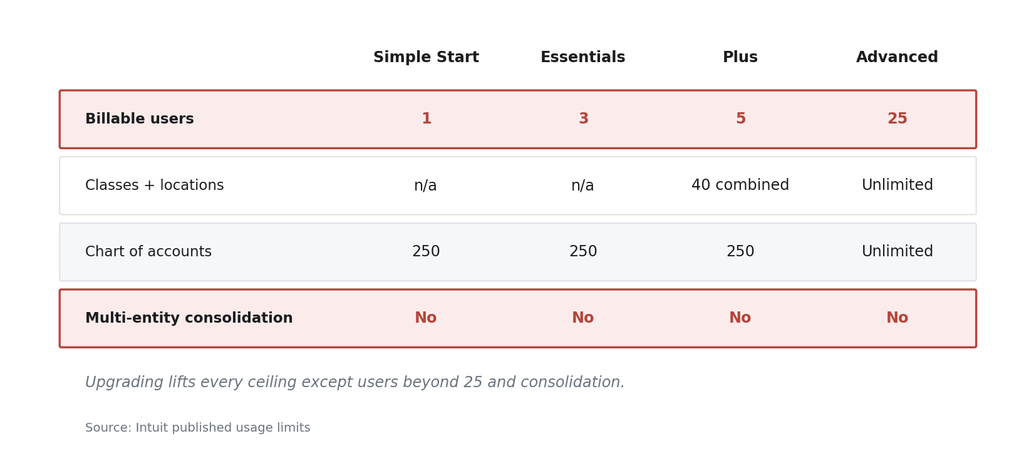
Unlike the user cap, which still tops out at 25 on Advanced, the dimension ceiling disappears entirely. The QuickBooks Plus plan caps classes and locations at 40 combined, while Advanced makes both unlimited. If the number of classes and locations is your constraint, upgrading may resolve that specific limit. Confirm that the available reporting functionality also meets your needs. Treat that cap as a reason to change plans rather than platforms.
You Are Still on QuickBooks Desktop
Intuit ended support and connected services for QuickBooks Desktop 2023 after May 31, 2026. Affected services include payroll, payments, and online bank feeds, and discontinued versions no longer receive critical security updates.
This does not mean every Desktop customer must move to a different platform. Intuit provides upgrade options for existing subscribers, and Desktop Enterprise remains available. Review the options for your specific version and subscription.
A support deadline is a useful opportunity to compare the cost and suitability of upgrading with the longer-term benefits of changing platforms.
Four QuickBooks Alternatives That Matter (and When to Stay)
Most comparisons rank tools by price and ease of use, because they’re written for freelancers and small businesses. Those are the wrong criteria once you’re running two or more entities. Score the options instead against entity count, user volume, integration count, close duration, and the operational modules you’ll need within three years.
| Option | Fits | What to evaluate |
|---|---|---|
| Stay on QuickBooks Online | Businesses whose current accounting and reporting needs remain manageable | User limits, separate company subscriptions, and additional consolidation or operational tools |
| Xero | Businesses evaluating a different accounting platform | Consolidation requirements, operational integrations, and plan-specific functionality |
| Intuit Enterprise Suite | Groups evaluating multi-entity financial management within the Intuit portfolio | Current operational capabilities, international requirements, and feature availability |
| Sage Intacct | Organizations prioritizing financial management and dimensional reporting | Required subscriptions and how operational systems connect to finance |
| NetSuite | Organizations seeking integrated financial and operational management | Required modules, implementation scope, ongoing ownership, and total cost |
A second entity does not automatically rule out QuickBooks Online or Xero, but it adds requirements their core accounting products may not address on their own. Compare the effort and cost of additional tools with the benefits of a platform designed for multi-entity financial management.
The next question is how closely finance needs to connect with operations, and which capabilities should sit within the selected platform.
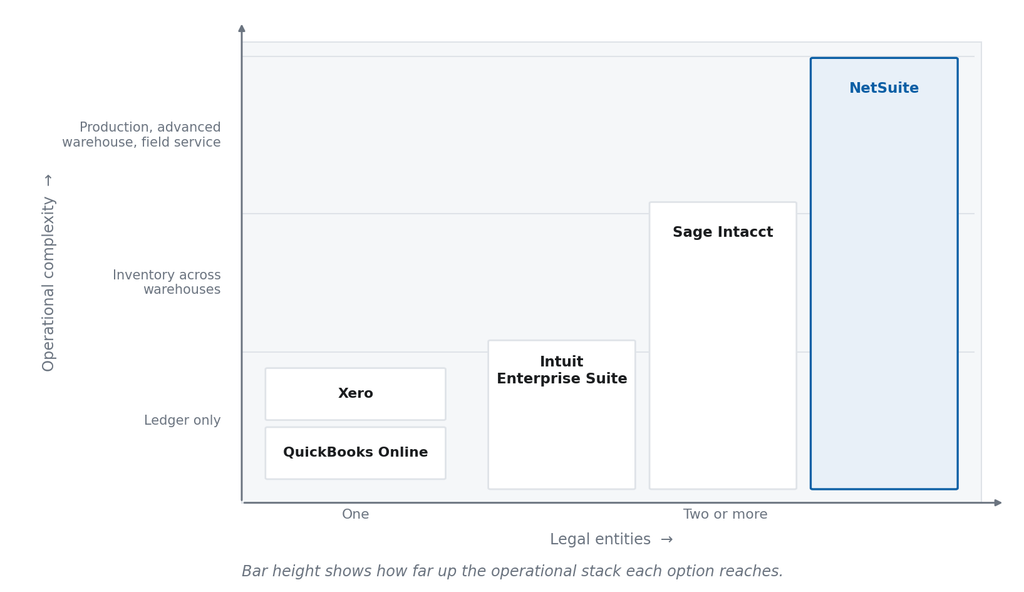
Intuit Enterprise Suite is Intuit’s offering for businesses with more complex financial management needs, including multi-entity operations. It is worth evaluating for groups that want to remain within the Intuit portfolio.
Review its current consolidation, currency, inventory, and operational capabilities against your requirements. Confirm which features are generally available, which remain in beta, and which require other systems.
Apply the same evaluation to Sage Intacct and NetSuite. Compare the specific modules, integrations, controls, and implementation scope proposed for your business rather than treating the products as a fixed progression from basic to advanced.
Sage Intacct vs NetSuite for Multi-Entity Groups
Both platforms consolidate multiple entities natively. What separates them is the operational side of the business: whether inventory, production, and warehouse work runs on the same platform as the ledger, or connects to it from outside.
Sage Intacct is finance-first. Dimensional reporting, generally accepted accounting principles (GAAP) depth, and audit support are its strengths, which is why it suits professional services firms and nonprofits. Its inventory module tracks stock across warehouses, but production planning, advanced warehouse management, and field service run in add-ons or a separate Sage operations product rather than natively alongside the ledger. We mapped that boundary in a full comparison.
NetSuite covers the same consolidation requirement and adds inventory, order management, manufacturing, warehouse management, CRM, and field service on one data model. The inventory transaction, the production order, the intercompany transfer, and the financial posting become linked records in one database instead of four records syncing across four systems.
The required capabilities may involve additional modules, licensing, and configuration; confirm the scope of the proposed solution.
The decision depends on which operational systems you intend to retain and how closely they need to connect with finance. Compare the proposed modules and integrations, implementation effort, ongoing maintenance, and total cost. Neither the lighter implementation nor the greater return should be assumed before that assessment.
When NetSuite Is the Right Answer
NetSuite can be a strong fit when a business needs integrated financial and operational management across entities or locations. A single-entity company may also benefit when its processes, reporting, or growth plans justify the investment.
Multi-Entity Consolidation Without the Spreadsheet
A group running five entities in three currencies builds its consolidated statement by hand. Someone exports from each file, normalizes the charts of accounts, and eliminates intercompany activity in a spreadsheet. Currency gets translated at a rate somebody types in. The board sees the number three weeks after the period ends.
NetSuite OneWorld supports a subsidiary hierarchy with multiple base currencies and consolidated reporting. Configured intercompany eliminations and currency translation can reduce manual consolidation work. Local statutory requirements, ownership complexity, and any additional functionality should be assessed separately. Finance still needs to reconcile, review, and complete the relevant close activities.
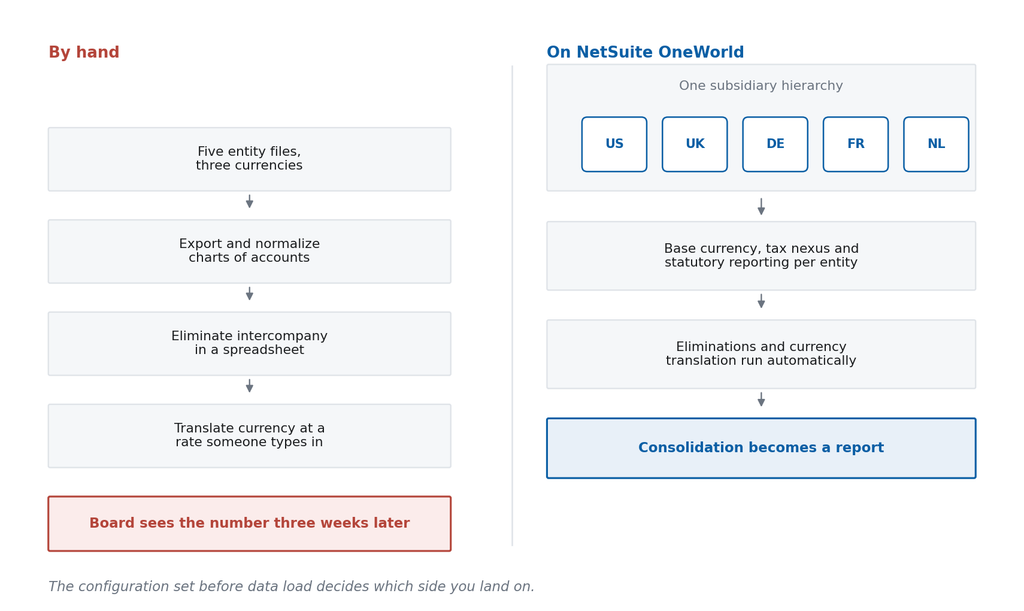
Whether you get that outcome is decided by the configuration underneath it. The entity hierarchy, elimination subsidiaries, segment structure, and chart-of-accounts design all have to be settled before data is loaded. Get those wrong and the group reconciles inside NetSuite instead of inside Excel. Every Bring IT implementation maps business processes and produces a System Design Document before any configuration begins.
Integration Architecture After the Move
Replacing QuickBooks does not remove the connections to your warehouse system, e-commerce channels, payroll provider, or EDI partners. It relocates them. How those connections are designed determines how much of your close is still manual a year from now.
Integration design should address missing or rejected records, monitoring, recovery, and ownership of exceptions. Automatic retries may help with temporary failures, while data or mapping errors can require investigation.
One food manufacturing client replaced five middleware flows between its manufacturing execution system (MES) and NetSuite with point-to-point RESTlets. That saved roughly $8,000 per flow, about $40,000 a year, and removed the third-party hop adding latency to manufacturing transactions. Every flow ships with retriggering on failure and alerting, so failures surface when they happen.
Bring IT works with integration options including Celigo, Boomi, and custom connections. The choice depends on the systems involved, transaction volumes, available connectors, monitoring requirements, and ongoing maintenance.
Document the integration scope and key assumptions during project planning, then validate the detailed design and test the relevant business processes before go-live.
When NetSuite Is the Wrong Choice
NetSuite may not be the right investment when the current system meets the business’s needs and the expected benefits do not justify implementation and ongoing costs. Entity count or close duration alone should not decide that question.
Consider the team’s capacity to adopt and maintain the system, the capabilities already available, and whether a smaller change could resolve the problem. A useful evaluation should explain both the reasons to move and the reasons to stay.
Migrating from QuickBooks to NetSuite
Companies that treat the move as a data migration tend to reproduce their QuickBooks reporting problems inside NetSuite, because those problems sat in the process design.
Here’s how you should migrate from QuickBooks to NetSuite:
Process mapping comes before configuration. Walkthroughs establish how the company actually raises a purchase order, recognizes revenue, handles intercompany activity, and sequences the close. Document the agreed requirements and solution design, with review and approval milestones defined in the project plan.
Chart-of-accounts normalization comes before data load. A chart built for single-entity reporting will not carry a multi-entity structure. Segment design, department mapping, and intercompany account structure get resolved first. Correcting a chart after transactions post against it is considerably harder.
Historical data scope is a decision, not a default. NetSuite records more granular detail than QuickBooks does, so old QuickBooks history often lacks the attributes NetSuite’s modules expect. Most companies migrate open balances, open transactions, and a defined window of history, then archive the rest. What you load determines what your reporting can do, which is why data services sit inside the implementation and data quality is scoped rather than assumed.
Plan for the first close as well as go-live. Test integrations end to end, validate reporting and opening balances, and rehearse key close activities in a test environment. Define responsibilities and support for the first close, with success criteria that reflect the customer’s actual requirements.
How Grover Gaming Made the Move
Grover Gaming is a useful reference point, though the company migrated from Sage, not from QuickBooks.
The Greenville, North Carolina company had grown to roughly 350 people with offices and distribution facilities across nine states. Its finance system could not scale with that footprint, carried no CRM integration, and left inventory and billing schedules on non-standard processes. That is the same structural position a multi-location group reaches on QuickBooks.
Working with Bring IT, Grover Gaming went live across 35 locations and four warehouses, running 30 personalized roles and dashboards. It automated over 80% of the critical processes it had run manually, cut time to market by 30%, and reached ROI in under six months.
Choosing a NetSuite Implementation Partner
Two companies can buy identical NetSuite licenses and end up in different places. The variable most companies overlook, because they’re focused on comparing platforms, is who implements it.
One thing to know before you start: Bring IT is an Oracle NetSuite Alliance Partner and does not resell NetSuite licenses. The NetSuite representative owns the license conversation. Bring IT owns the implementation, the integration architecture, and the relationship afterward.
Four questions separate partners who stay accountable from those who close a project and move on:
- How do you decide integration architecture, and when?
The answer should name middleware, pre-built connectors, and point-to-point as options, with the decision documented in the SOW.
- What happens between go-live and our first clean close?
Ask for a named plan with milestones.
- What does month 13 look like?
Ask how ongoing support, training, optimization, and future changes will be handled after implementation. Bring IT’s 360° Care managed services offering can support these needs according to the selected package and agreed scope. Confirm included services, support responsibilities, and how additional projects are estimated.
- Have you implemented NetSuite in our industry?
Ask for the deployment itself, with the entity structure and modules involved.
Companies already on NetSuite recognize those questions because a previous partner answered them badly. That situation usually calls for remediation rather than reimplementation, and we set out the signs that a partner relationship has run its course in a separate piece on switching partners.
How to Score Your Own Situation
Score yourself on entity count, user volume, integration count, close duration, and the operational modules you will need within three years. Then choose for the business you will be running in three years. This platform is the one your finance team works inside for the next decade.
Most of that scoring you can do internally. The part worth an outside read is what your entity structure and integration count imply for scope. That is where estimates and outcomes drift apart, and it is the number you will be held to.
Tell us how your finance stack runs today, and we will show you where you land. Book a fit review.
FAQ
Is QuickBooks Desktop going away in 2026?
No. Intuit ended support and connected services for QuickBooks Desktop 2023 after May 31, 2026, but that does not mean the entire Desktop product line is going away. Existing subscribers have upgrade options, and QuickBooks Desktop Enterprise remains available. Check the options for your specific version and subscription before deciding whether to upgrade or move to another platform.
How much does NetSuite cost?
Oracle does not publish list pricing, and confirm subscription pricing through the appropriate NetSuite sales channel. The license drivers you can estimate in advance are entity count, module set, and user count. Implementation is scoped separately, and its drivers are integration complexity and how much historical data moves. A partner quoting a total before process discovery is guessing at the half of the number that matters most.
Can we keep QuickBooks for one entity and run NetSuite for the rest?
Yes. Some groups use this approach during a phased rollout or retain different systems for specific business needs. Consolidated reporting then requires consistent mappings, reliable data transfers, reconciliation controls, and a defined process for intercompany activity. Compare the ongoing effort and cost with standardizing on one platform before deciding whether the arrangement should be temporary or permanent.
Do our accountants and external auditors work in NetSuite?
Yes, with one adjustment. NetSuite supports transaction-level drill-down, audit trails, role-based access, and locked periods. Auditors can be given read-only access scoped to specific records and periods, which beats assembling evidence from exported spreadsheets. The adjustment is on the talent side, since fewer accountants are trained on NetSuite than on QuickBooks.