Most finance leaders decide they’ve outgrown QuickBooks long before they act.
The close keeps slipping. Group numbers move into a spreadsheet nobody wants to own. Somewhere in there, the system stops reporting the business and starts depending on the people who work around it. Months pass in that state, and often years.
What holds a decision up is a distinction most evaluations never test: whether the outgrowth sits on the accounting side of the business or the operations side. Consolidation and reporting sit on one. Inventory and production sit on the other. Both produce the same symptoms and need different platforms. Choosing the wrong one tends to lead to a second migration within three years.
Below, we’ve listed the signs worth measuring, the thresholds that separate a stretched system from a failing one, and what makes each replacement tier correct.
Key Takeaways
- No defensible revenue threshold exists. Entity count, jurisdiction count, close duration, and operations complexity are the real determinants.
- Capacity limits and architectural limits are different problems. A higher Intuit tier resolves the first. No tier resolves the second.
- QuickBooks does not offer automated consolidation at any tier. Most organizations find the separate-file model unsustainable beyond three to five entities.
- Ledger-side and operations-side outgrowths appear identical in a finance-led evaluation, but they resolve at different platform tiers.
- Three exit paths follow from that: moving up the tier inside Intuit, a finance-only mid-tier platform, and a full operational ERP.
What QuickBooks Is Built to Handle, and Where That Boundary Sits
QuickBooks delivers on its design, and it delivers well. For a finance team of two or three managing a single entity, it handles bookkeeping, invoicing, payroll, and reporting without friction. When a growing company strains against it, the platform is doing what it was built to do, inside conditions the business has outgrown.
Those conditions include:
- A single legal entity with limited reporting complexity and no consolidation requirement.
- Simple, predictable revenue without contract-based recognition obligations.
- Low-volume inventory that is not critical to financial reporting.
- A close completed within a few days, without reconciliation bottlenecks.
- No requirement for real-time, multi-dimensional reporting across channels, product lines, or entities.
Oracle NetSuite confirms that no hard rule based on revenue or headcount determines when a company moves past those conditions. Structure determines it.
Capacity Limits Versus Architectural Limits
The most useful distinction to draw early is between the ceilings a company can hit: capacity and architectural limits.
Capacity limits are constraints that a higher tier removes, and Intuit publishes every one, which makes the runway calculable:
- Billable users. Five on QuickBooks Online Plus, 25 on Advanced, up to 40 simultaneously on Desktop Enterprise.
- Chart of accounts. Two-hundred-and-fifty entries on Simple Start, Essentials, and Plus. Unlimited on Advanced.
- Classes and locations. Forty combined on Plus, counted across both lists together rather than separately.
- Custom fields. Twelve per transaction on Advanced.
Only active records count toward a limit, so deactivating unused classes creates headroom without an upgrade. Accounts exceeding a cap can be suspended at the next renewal, turning a gradual constraint into an interruption.
Architectural limits are built into the foundational design, and no licensing change touches them. QuickBooks has no consolidation module. Its chart of accounts is flat, and its class and location fields work as optional categorization rather than structural segments that roll up across entities.
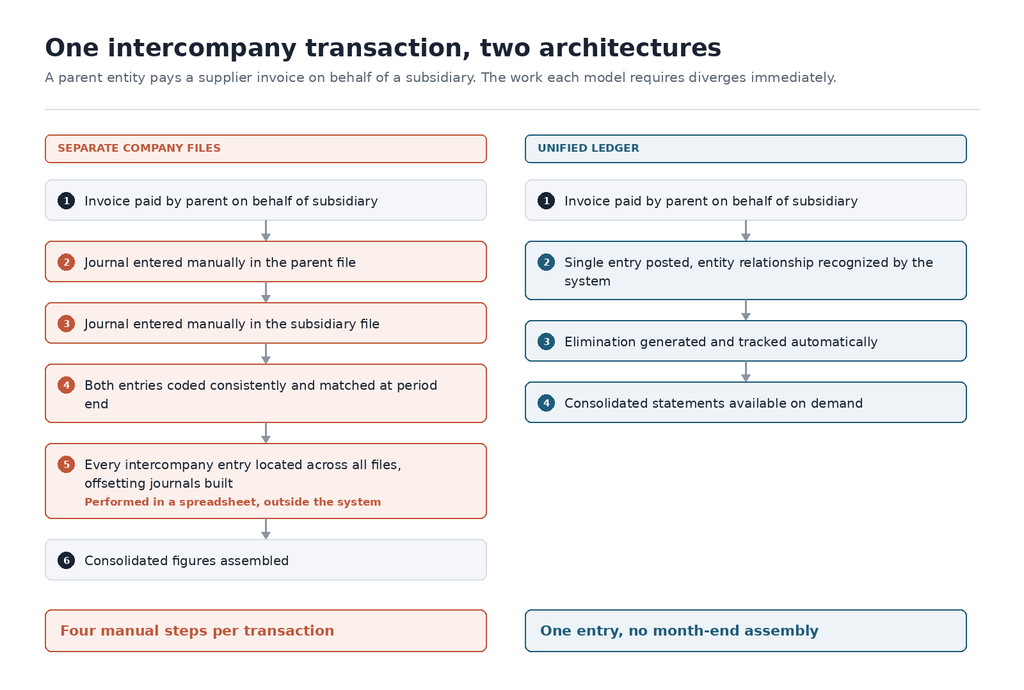
The consequence is concrete. A company with multiple legal entities maintains a separate file for each entity at every tier, enters intercompany transactions manually in both sets of books, and eliminates them by hand at month-end. Upgrading within Intuit does not change that sequence.
Why Enterprise Adds Headroom Without Adding Consolidation
QuickBooks Enterprise raises user capacity, expands list limits, and adds advanced pricing and industry-specific reporting. For a single-entity business hitting capacity constraints, those are real improvements.
The gap shows up at the point where the numbers have to combine. Intuit markets Enterprise as covering multi-company management, and the wording on its own pricing page repays close reading. What Enterprise produces is combined reporting. A combined report sums the entities. A consolidated statement removes intercompany activity through eliminations and applies currency translation before the group figures appear.
That distinction is where the upgrade path ends. Enterprise adds no automated eliminations, no currency translation across entities, and no dimensional reporting that segments across legal entities. All of it stays with the finance team at every tier.
Finance leaders evaluating Enterprise as a path to multi-entity management should establish which of the two outputs a demonstration is showing.
Why the Timing of This Decision May No Longer Be the Company’s Own
Knowing where the boundary sits is one question. Choosing when to act has become a separate question for part of the QuickBooks base, because Intuit’s release schedule now dictates the timeline.
Per Intuit’s service discontinuation policy, QuickBooks Desktop 2023 stopped receiving support after May 31, 2026. Organizations that did not upgrade lost security updates, payroll, payments, and bank feeds. Multi-currency and exchange rate updates sit on the same list, which matters most for anyone running entities in more than one currency. The Desktop line has not been withdrawn, and Enterprise continues to be sold and supported.
Postponing the conversation to a quieter quarter is no longer an option. A compressed timeline squeezes the diagnostic work, which is how the wrong tier gets chosen and how staying too long in the old ERP system becomes its own risk.
The Measurable Signals That Appear Before the System Formally Fails
Whether the timeline is imposed or chosen, the diagnostic work remains the same. The signs that a company is outgrowing QuickBooks are measurable well before they become visible, and the useful ones are numeric rather than descriptive.
Close Duration, Measured Against a Real Benchmark
Close duration is the clearest indicator, partly because an external benchmark exists. APQC’s cross-industry benchmarking shows the median monthly close is around six days, with top performers under five and bottom-quartile organizations at ten or more.
One caveat matters. APQC measures calendar days from the trial balance to the completed consolidated statements. In QuickBooks, that final step happens outside the system, so an honest comparison includes the spreadsheet assembly phase rather than stopping at the point where each file closes.
Trend carries as much information as the absolute number. A close that has drifted from five days to eight across four quarters describes a system falling behind the business, even inside the benchmark range.
Entity Count and Where the Separate-File Model Turns Fragile
At two legal entities, the separate-file model works. The team runs two files, reconciles intercompany activity by hand, and assembles consolidated figures in a spreadsheet.
At three to five entities, the manual load compounds, and most organizations find the approach increasingly difficult to sustain. Beyond five, currency discrepancies accumulate, and intercompany balances go unmatched for weeks.
Two related signs surface later, because neither is visible on a dashboard. A first filing obligation in an unfamiliar tax jurisdiction converts a manageable constraint into a blocking one, as does a subsidiary reporting in a different functional currency. Transaction line depth works the same way, compounding the close burden until the business has outpaced the system.
QuickBooks Multi-Entity Consolidation Limitations
Of those signs, consolidation carries the most weight, and it’s worth understanding as a mechanical rather than as a feature gap.
How the Separate-File Model Degrades
QuickBooks requires a separate company file for each legal entity. No parent-child relationship exists between files, no consolidated chart of accounts spans them, and intercompany balances never synchronize.
The mechanics are easiest to see in a single transaction. When a parent entity pays a supplier invoice on behalf of a subsidiary, the entry must be recorded in both files, coded consistently in both, and matched precisely at period-end. One transaction is trivial. Several hundred across five entities, in two currencies, is a reconciliation project.
At two entities, a competent bookkeeper absorbs it. At three, the error rate climbs. At five or more, it tends to require dedicated headcount, and errors still accumulate. As covered in our guide to cloud-based ERP, spreadsheets introduce human error, expose version control, and lack real-time auditability.
Where Small Discrepancies Turn Material
At month-end, consolidation requires eliminating intercompany activity so revenue, expenses, and balances are not counted twice. That means locating every intercompany entry across all files, creating offsetting journals, and proving the eliminations balance before group figures appear. The work is done in a spreadsheet, every period.
The failure mode is gradual. A timing difference in when a payment was recorded. A rounding variance in a currency conversion. A missed elimination. Each compounds across periods, and when the board’s consolidated balance sheet rests on that spreadsheet, the finance leader owns the exposure the moment a figure is questioned.
Adding a filing obligation in a new jurisdiction compounds it further. VAT, local statutory reporting, and e-invoicing requirements all fall to the finance function to handle manually.
Manual Controls That Increase Cost and Risk
Consolidation is one exposure. Controls are another, and they surface on a different timetable.
Role-based permissions, automated approvals, and system-generated audit logs are standard in ERP platforms. In QuickBooks, they are limited or manual. For contract-based revenue, ASC 606 compliance runs in spreadsheets outside the ledger and is reconciled back each period, making the control itself manual. Platforms carrying revenue recognition logic inside the system remove that dependency.
None of this registers day to day. It registers when a capital raise, credit facility, or acquisition brings an external party into the control environment. Limited permissions, absent approval workflows, and spreadsheet-based recognition are all findings, and each affects valuation, deal terms, or timing.
Timing makes it expensive. Consero’s 2022 CFO Survey found that 88% of CFOs underestimated how long moving financial processes onto a larger platform takes. The gap is usually found after the window to remediate has closed.
Where the Outgrowth Sits: In the Ledger or in the Operation
Consolidation and controls sit on one side of a line that determines everything downstream. Finance-led evaluations tend to test only that side, which is how a platform passes evaluation and then fails in production.
What Ledger-Side Outgrowth Looks Like
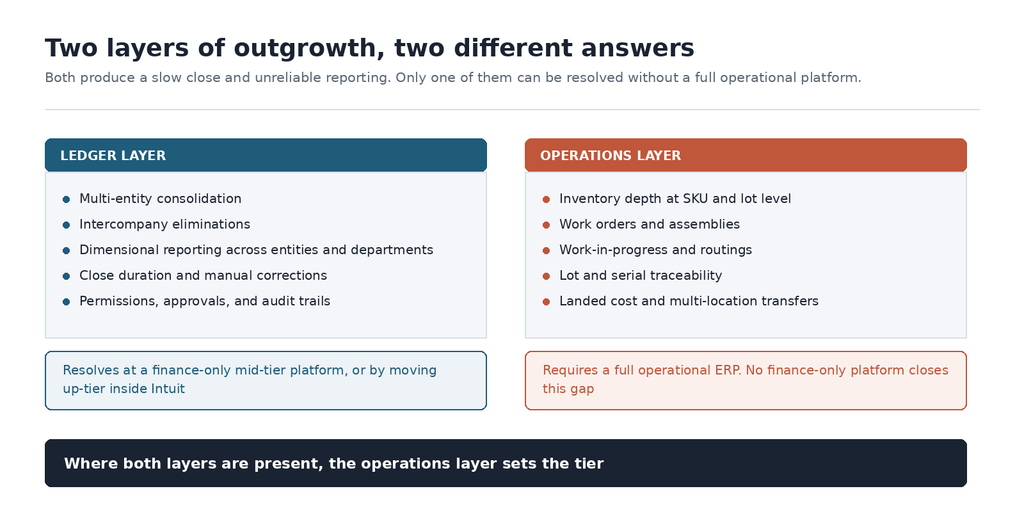
Ledger-side outgrowth sits in the reporting and consolidation layer:
- Multi-entity consolidation and intercompany eliminations across legal entities.
- Dimensional reporting across entities, departments, and locations.
- Close duration extended by manual reconciliation and correction.
- Controls infrastructure, covering permissions, approvals, and audit trails.
A company with three entities, moderate volume, and no inventory complexity that is losing its close has ledger-side outgrowth, which resolves without a full ERP.
What Operations-Side Outgrowth Looks Like
Operations-side outgrowth sits in the inventory and manufacturing layer:
- Inventory depth at SKU and lot level, across multiple locations.
- Work orders and assemblies, with work-in-progress and routings.
- Lot and serial traceability, backward and forward.
- Landed cost calculation and multi-location transfers.
In QuickBooks, aligning stock with the general ledger in real time requires external systems and manual reconciliation, so inventory and financial records diverge between cycles.
Plenty of companies show both. Testing only the ledger symptoms produces a recommendation that fixes consolidation and leaves the operations problem in place. Where both layers are present, the operations layer sets the tier.
The Three Exit Paths and the Conditions That Make Each One Correct
With the constraint located, the field narrows to three options. All three are legitimate, and each is wrong under conditions worth naming before a shortlist is built.
| Path | Fits when | Wrong answer when |
|---|---|---|
| Up-tier inside Intuit Intuit Enterprise Suite | Few entities, ledger-side outgrowth, limited inventory or manufacturing requirements | Operations-side complexity is present, or an acquisition or new jurisdiction sits inside 18 months |
| Finance-only mid-tier For example, Sage Intacct | Consolidation, dimensional reporting, and controls are the whole constraint | Inventory depth, traceability, or production integration enters scope |
| Full operational ERP For example, NetSuite | Inventory, traceability, work-in-progress, or multi-location transfers form part of the constraint | The business is a single entity with no operational complexity, where the platform outruns the requirement |
Most evaluations establish what a platform can do, and stop there. The sections below cover the limitations of each path.
Moving Up-Tier Inside Intuit
Intuit Enterprise Suite launched in September 2024, and its Spring 2026 release positions it as an AI-native platform with multi-entity close automation and transaction-level eliminations. For a defined profile, it’s a genuine option, and the shorter migration inside a familiar interface is a real advantage.
TechnologyAdvice’s 2026 review identifies inventory depth as the principal limitation, rating it a strong fit for construction and professional services and insufficient for manufacturers and product-based businesses.
That has a specific consequence for existing Desktop users. Several inventory capabilities in Desktop Enterprise are not matched in Enterprise Suite, so an inventory-heavy business moving between them steps forward on the ledger and backward on operations. How much AI-native positioning should carry in a ten-year decision is worth weighing against maturity that has survived audit.
Moving to a Finance-Only Mid-Tier Platform
Sage Intacct is the reference point in this tier. It handles multi-entity consolidation with automated eliminations, currency translation, and a dimensional structure that reports across entities, departments, and locations without a separate file per entity. Controls sit inside the system rather than beside it, which addresses the audit and diligence exposure directly. For a company whose entire problem is the close and the reporting layer, that is the complete answer at a lower cost and a shorter implementation than a full ERP.
The limitation is on the operations side. Inventory is transactional rather than operational, with no work orders, no routings, no lot or serial traceability, and no landed cost. Manufacturing and distribution requirements are met through third-party integrations, which reintroduces the reconciliation the migration was meant to remove.
That makes the fit condition a forward-looking one. A professional services firm with five entities and a consolidation problem is a strong candidate. A food manufacturer with ten entities and lot traceability is not. Moving too early to a full ERP introduces costs the business does not need, and moving to a finance-only platform when operations-side outgrowth is present means running the evaluation again in three years.
Moving to a Full Operational ERP
For operations-side outgrowth, a full operational ERP is the right tier. NetSuite connects inventory natively to the general ledger, carries revenue recognition inside the system, and, through OneWorld, delivers automated eliminations across entities.
Grover Gaming shows what that looks like. The company moved from Sage rather than QuickBooks, but the trigger was operations-side: inventory problems and a platform that could not scale. The build included Advanced Inventory, WMS, and Demand Planning alongside financials. Within six months, it had automated more than 80% of previously manual processes and reached full ROI, with a 30% gain in production efficiency and time-to-market.
Bring IT’s implementations begin with business-process mapping and a System Design Document before any configuration. The chart of accounts shows why. A QuickBooks chart of accounts rarely transfers cleanly, and the data migration is the only practical moment to restructure it. Entity hierarchy, segment design, and historical depth are cheap to decide then and costly to revisit.
Jurisdiction narrows the field fastest. A filing obligation in a country with e-invoicing mandates or VAT complexity eliminates most mid-tier platforms and any ERP tier lacking in-country localization. Bring IT’s LATAM localizations cover eight countries natively, with in-country teams handling statutory and tax compliance.
How Finance Leaders Locate the Transition Threshold
Knowing when to move from QuickBooks to an ERP comes down to four questions, all answerable internally, and before any vendor is contacted.
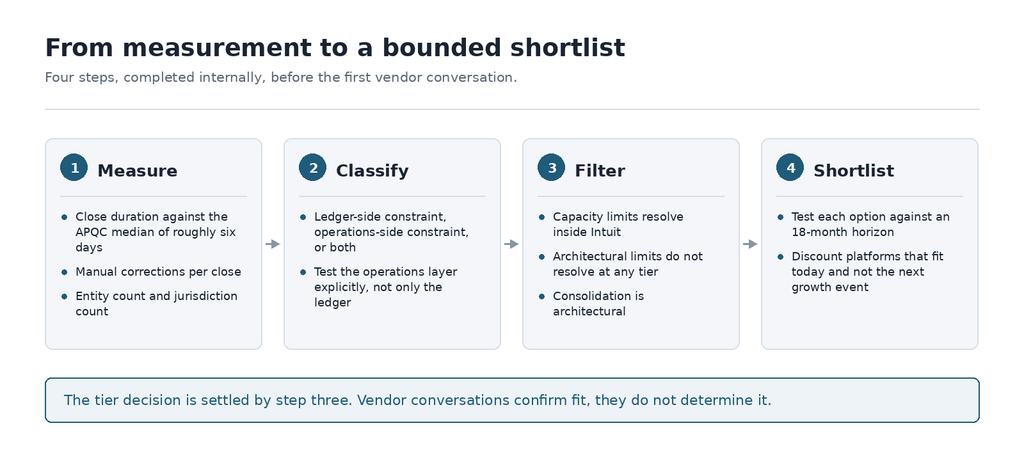
- How long did the last close take, and how many manual corrections did it need? Measure against the APQC median of roughly six days, and treat the four-quarter trend as seriously as the current figure.
- Can finance produce a consolidated view without a spreadsheet assembly process? Revenue by channel, margin by product line, cash by entity. When that takes manual exports and hours of preparation, the gap is already material.
- Would the current audit trail satisfy an external auditor today? When the answer is no, the control gap exists whether or not a diligence event is on the calendar.
- Does an acquisition, capital raise, or new jurisdiction sit within an 18-month horizon? A platform that fits today and not next year’s acquisition should not survive the shortlist.
The Diagnosis That Prevents a Second Migration
Most finance leaders settle whether they have outgrown QuickBooks before they evaluate anything. The outcome depends on where that outgrowth sits, because location sets the tier.
A platform chosen against the wrong constraint holds until the next growth event, when the cost of a second migration arrives alongside the acquisition that triggered it. That migration competes for the same finance team, the same weekends, and the same attention the integration needs. Scope gets cut to hit a date, and the decisions that get deferred are usually the structural ones.
A planned transition protects the sequencing: time to diagnose, a negotiating position free of deadline pressure, and a remediation window that closes once diligence begins. Book a readiness review with a Bring IT expert.
FAQs
Does Moving to Intuit Enterprise Suite Count as Leaving QuickBooks?
Yes. It is a distinct product built on QuickBooks Online infrastructure, so the move is a platform change rather than a tier upgrade. TechnologyAdvice identifies inventory depth as its principal limitation, and manufacturers or distributors may lose capability they currently have in Desktop Enterprise.
How Long Does a Move From QuickBooks to an ERP Usually Take?
Most mid-market implementations run three to six months, driven by entity count, data condition, and how many processes change alongside the system. The variable that moves the date is rarely the software. It is the availability of the people who know how the business actually runs, which is why the diagnostic work belongs before the vendor conversation rather than during it.
What Happens to QuickBooks History During a Migration?
Full transactional history is rarely migrated, and it rarely needs to be. Common practice is opening balances plus two to three years of summary data, with the legacy file retained read-only for audit reference. Deciding the depth early matters, because it determines the chart of accounts structure and the reporting comparisons available in year one.
What Is the Practical Difference Between Consolidation and a Spreadsheet Roll-Up?
True consolidation happens inside a unified system. Intercompany transactions are recognized automatically, eliminations run as a system process, currency revaluation applies consistently, and statements tie directly to underlying records. A roll-up is assembled outside the system, and its figures cannot be traced back without reconstructing the spreadsheet’s logic. Our comparison of NetSuite and QuickBooks covers what changes structurally once the move is made.