Data migration from Sage to NetSuite moves an organization’s financial history and master records into a system with a different structure. That makes it a business decision before it is a data project.
The right approach depends on the Sage product and version in use, how it was configured, and which systems connect to it.
Bring IT, an Oracle NetSuite Alliance Partner, supports data migration within broader NetSuite implementations. Our proprietary DataBridge framework adds structure, automation, and validation to the data workstream. For a Sage migration, the extraction approach and applicable tools are confirmed after assessing the product, version, configuration, and available data.
In this guide, you’ll learn why companies make the move, how the Sage product influences it, and the pros and cons before you make a decision. By the end, you’ll know which decisions to settle first and how Bring IT structures the move.
Key takeaways
- Your Sage product shapes the plan: Product, version, configuration, and connected systems shape extraction and mapping.
- The move has real trade-offs: NetSuite brings multi-entity management on one platform. It also brings a subscription, implementation effort, rebuilt reports, and retraining.
- Data decisions come first: How much history moves, and in what form, sets the scope.
- Method lowers risk: SuiteSuccess gives the implementation its foundation. The Data Bridge Framework handles the data workstream, with validation before the load.
- Cutover is an operational choice: The window suits operations, often a weekend, rather than a period-end date.
Why Companies Outgrow Their Sage Setup
Most organizations choose Sage at a stage when it fits. Many still run well on it, and meeting reporting needs isn’t a problem.
The question changes when the business takes on structure the original setup was never chosen to carry. That usually shows up as a business event:
- New entities or countries: Consolidation moves into spreadsheets.
- Board pressure: Leadership wants real-time visibility across locations, faster than current reporting can deliver it.
- Disconnected operations: Customer and inventory data sit in tools that do not connect to the ledger.
- New integrations: Each added system needs its own connection to Sage.
NetSuite answers several of these needs in one platform. OneWorld manages subsidiaries across currencies and tax jurisdictions in a single account, with consolidated reporting.
For older on-premises setups, our analysis of legacy ERP risk shows when staying starts to cost more than moving.
How Your Sage Product Shapes the Migration
Sage is a family of products, and each one stores data differently. An independent overview of the Sage ERP line describes how products differ. Each difference leads to a different migration:
| Sage product | Positioned for | What it often means for data migration |
|---|---|---|
| Sage 50 | Accounting for small businesses, rather than a full ERP | The move adds ERP processes, such as inventory and order management, so process design sits alongside the ledger move |
| Sage 100 | Smaller product-based businesses, on-premises or hosted | Module-based records, such as receivables, payables, inventory, and sales orders, map into NetSuite’s unified records |
| Sage 300 | Multi-company and multi-currency operations | Each company typically becomes a NetSuite subsidiary, which brings consolidation and intercompany setup into scope |
| Sage X3 | Mid-to-large manufacturers and distributors | Production and supply chain records, such as bills of materials and work orders, widen the scope along with any customizations |
An on-premises database offers different extraction options than a cloud instance. The version matters too, since older releases may hold fields and modules differently than current ones.
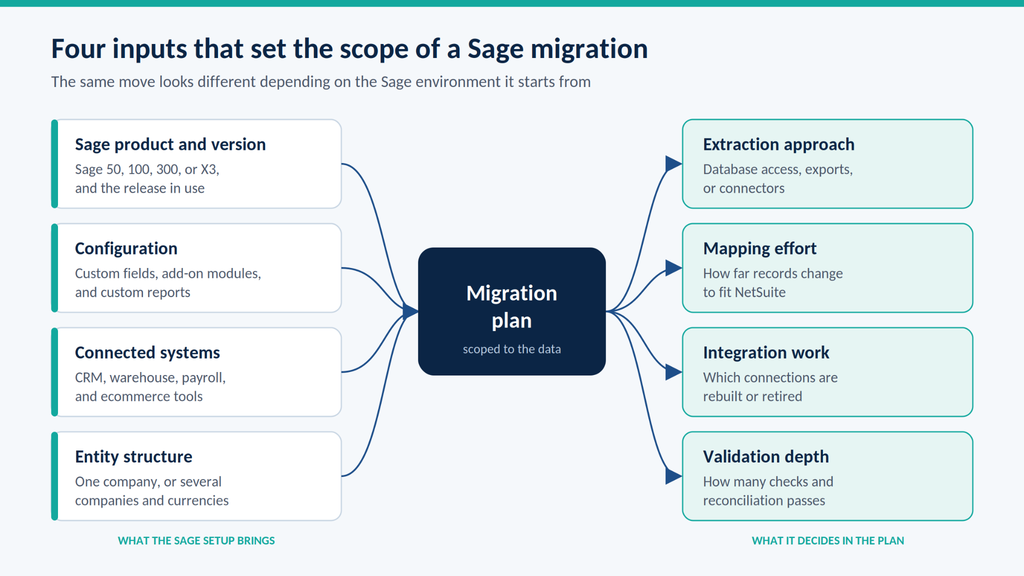
Configuration and connections add the rest of the scope. Teams either move custom fields and add-on modules as they are or redesign them. CRM and warehouse integrations need reconnecting or replacing.
That is why a limitation in one Sage environment says little about another, even on the same product.
Sage Intacct warrants a separate assessment because its cloud financial management capabilities differ from the other Sage products discussed here. Organizations considering a move should compare their current functionality and business requirements with NetSuite before defining the migration scope.
Pros and Cons of Moving From Sage to NetSuite
A clear view of the trade-offs makes the decision easier to stand behind. NetSuite brings real capabilities at multi-entity scale, along with costs and effort that belong in the business case.
| Pros | Cons |
|---|---|
| Multiple subsidiaries managed in one account through OneWorld, with consolidated reporting | A recurring subscription to model against current Sage license and maintenance costs |
| Finance and operations on one platform rather than across linked tools | Implementation and data migration effort that draws on finance team time |
| Cloud delivery, with no on-premises servers to maintain | Reports and integrations rebuilt for NetSuite rather than copied across |
| Role-based dashboards and reports available as predefined SuiteSuccess components | Retraining for users who know Sage workflows well |
Organizations with several entities and connected operations gain the most migrating from Sage to NetSuite, because consolidation and reporting move into one system.
A single-entity business with stable processes may find Sage still fits. In that case, staying can be the right call.
Teams can plan for most of these disadvantages, which is why early scoping matters.
What to Decide Before Committing
Start by testing the business case against how the business runs today. Where does consolidation happen, and how many hours does it take each period? Which reports does leadership get only through manual work in Sage? Which connected systems does daily work depend on, and who in finance and operations can dedicate real time to the project?
The answers show whether the move is a growth decision or one that can wait. When it is a go, a few decisions shape the migration before anyone touches the data:
- Data scope: Which records move in detail, and which stay archived for reference.
- History depth: Decide which periods require transaction-level detail, which can be represented by historical period balances, and which will remain in an accessible archive. Opening balances establish the starting financial position in NetSuite but do not replace the detail needed for historical reporting.
- Account structure: Whether the chart of accounts moves as it is or is redesigned around NetSuite subsidiaries, departments, classes, and locations.
- Connected systems: Which systems reconnect through NetSuite integrations and which retire. Where a record lives in two systems, name the one that holds the master version.
- Decision owners: Who in finance owns data and mapping questions, so open items do not stall the project.
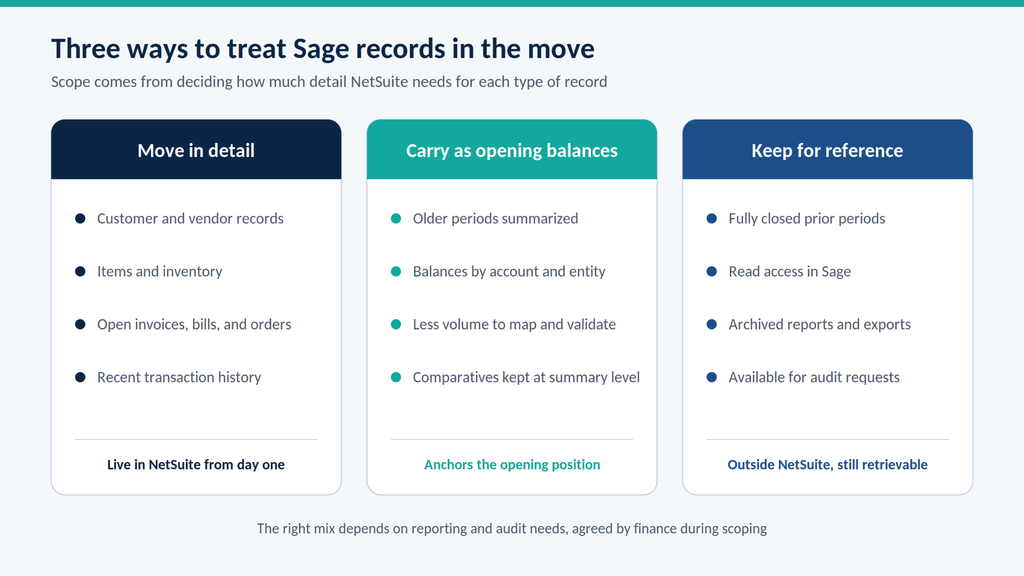
These answers also shape cost. More history and more connected systems both add mapping and validation work.
Clear answers at this stage give our Data Services team a realistic basis for timeline and budget.
Finance time is easy to underestimate. Data and mapping questions land on the people who know the ledger best, usually alongside their regular work. Planning for that time upfront keeps the project moving.
How Bring IT Structures a Sage-to-NetSuite Move
We split the move into two layers. The implementation layer sets up NetSuite, and the data layer moves Sage data into it. Keeping them distinct makes each one easier to scope.
SuiteSuccess as the implementation foundation
SuiteSuccess is Oracle NetSuite’s implementation methodology. It provides predefined components based on leading practices for specific industries and user roles.
Those components include predefined business processes, roles, a chart of accounts, dashboards, reports, and saved searches. A NetSuite implementation can use them where they fit, adjusted to how the business operates. A predefined account structure also gives Sage data a clear target to map into.
Oracle offers SuiteSuccess editions for industries including financials, software, wholesale distribution, and food and beverage. The methodology frames the implementation, while the data workstream runs inside it.
The Data Bridge Framework for the data workstream
The Data Bridge Framework is our proprietary migration methodology for the data side of the move, designed for validation, auditability, and scale. It builds on native NetSuite import capabilities by preparing and validating data before it loads into NetSuite.
Native CSV import can handle simple uploads. At scale, manual imports offer limited validation controls, increase the risk of dependency conflicts, create manual correction cycles, and reduce audit visibility.
The Data Bridge Framework adds structure across four capabilities:
- Controlled data extraction: Data moves from Sage into a controlled staging environment for review and preparation. Where Sage connects to other platforms, we coordinate extraction with the integration plan.
- Structured transformation and mapping: Pre-built templates cover common records such as accounts, customers, vendors, and items. For custom fields and records, our team documents the business rules with stakeholders before configuring the mappings.
- Automated validation and reconciliation: Checks flag missing required fields, referential conflicts, format mismatches, and imbalanced transactions. Migrated balances are compared against Sage.
- Guided load execution: Validated data loads into NetSuite through API-driven loads in a structured sequence, and the team monitors each load so records create correctly and dependencies between objects hold.
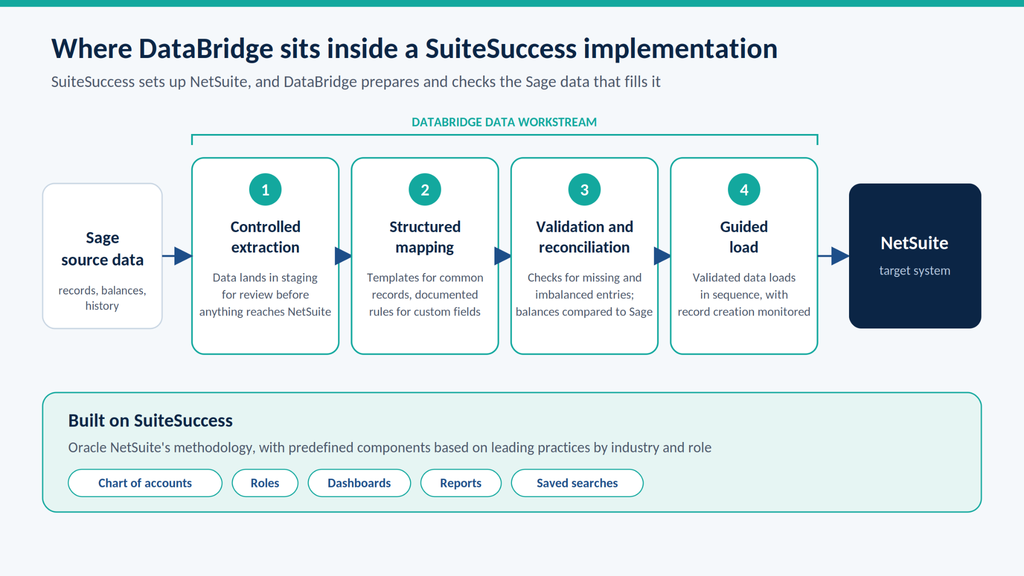
How much of each capability a project uses depends on scope. A clean, single-entity Sage 100 move needs less transformation than a heavily customized, multi-company Sage 300 move.
Our Data Services team sizes work during scoping, so the plan follows the data.
What structured data makes possible: Tournesol
Tournesol illustrates the broader reporting and visibility benefits of a NetSuite implementation. The manufacturer of commercial landscape products, with 300+ employees across the United States and Mexico, moved to NetSuite because its previous system made business data difficult to access and use.
With Bring IT, Tournesol completed its initial implementation in seven months. The scope included SuiteSuccess Manufacturing Premium, NetSuite OneWorld, financials with the chart of accounts, and Celigo integrations with Salesforce and BigCommerce.
Leaders can now drill into business information and follow it back to its source. The reported results:
- 30% less time spent retrieving information for everyday decisions
- 10 hours a month saved gathering business information
- 80% of routine business questions answered without technical assistance
“There’s just so much more transparency of data to help us make business decisions. That was my dream, and I achieved that dream,” said Annette Melin of Tournesol Siteworks.
These results reflect Tournesol’s broader NetSuite implementation. For organizations evaluating a Sage migration, the relevant lesson is to define reporting needs early and include them in the implementation and data-validation plan.
Scope Your Sage Move Before the Data Moves
A move from Sage to NetSuite goes best when the business case and the data decisions are settled first. Your Sage product sets the shape of the work, and the trade-offs set the expectations.
Timeline and cost follow that scope. Entity count, customization, connected systems, and history volume move the numbers most. A credible estimate starts with an assessment of your Sage data, not a price list.
With SuiteSuccess as the foundation and the Data Bridge Framework handling the data, we build the migration plan around what your Sage environment actually holds. After go-live, Bring IT Care, our managed-services practice, offers ongoing support as the business grows.
Planning a move off Sage? Contact Bring IT to scope the migration against your actual data.
Frequently Asked Questions
When should cutover from Sage to NetSuite happen?
Cutover timing is an operational choice. Teams pick a window when daily entry can pause with the least disruption, often a weekend. It does not need to match a period-end date.
Open transactions, such as unpaid invoices and open purchase orders, move at cutover so day-one work can continue in NetSuite.
How long does a Sage-to-NetSuite migration take?
The timeline depends on the Sage product, number of entities, data volume, customizations, connected systems, and availability of the customer’s team. Data migration is one workstream within the broader NetSuite implementation, with its own extraction, mapping, testing, reconciliation, and cutover activities.
For context, Bring IT completed Tournesol’s initial NetSuite implementation in seven months. That is a project example, not a standard timeline for a Sage migration.
A project estimate should follow an assessment of the source data and agreed scope. The cutover window and any period of parallel operation should be planned separately around business continuity and validation requirements.
How much finance team time does a migration require?
Finance involvement varies by project scope and phase. Key team members need time to explain existing processes, approve account mappings, resolve data questions, reconcile balances, test workflows, and sign off on migration results.
Agree on responsibilities and expected availability during project planning, with additional capacity around testing and cutover. Plan coverage for day-to-day work so the migration does not compete with essential finance activities.
Does Sage stay available after the move?
That depends on Sage licensing and how much history moved into NetSuite. Teams that keep access often leave fully closed periods in Sage for reference.
Teams without continued access usually export reports and archives for audit purposes before access ends.
Do connected systems need to be replaced when moving to NetSuite?
Not all of them need replacing. Many stay in place and are reconnected to NetSuite, as Tournesol did with Salesforce and BigCommerce through Celigo.
Others become redundant when NetSuite covers the function natively, such as inventory or order management. The integration plan decides which path each system takes.
Is SuiteSuccess required to migrate from Sage?
SuiteSuccess is not a requirement for a Sage migration. Oracle describes it as a methodology an account may use.
Whether a project uses its predefined components depends on how closely the business matches them. The Data Bridge Framework handles the data workstream either way.
Will migrated data be ready for analytics later?
It can be, when the transformation logic accounts for future reporting from the start. We align migration mapping with long-term analytics plans, including NetSuite Analytics Warehouse.
Our view on data migration risk explains why migration issues tend to surface once analytics expands.