A NetSuite health check is a structured audit of a live enterprise resource planning (ERP) environment. It surfaces where configuration, customizations, integrations, access controls, and automated workflows have drifted from how the business operates today. Drift rarely announces itself. Nothing fails outright, so the instance keeps running while reports need manual adjustment and users work around settings that no longer match the business.
The output is a documented current-state picture and a scoped list of what to fix before optimization begins.
Most companies implement NetSuite to achieve faster operations and reliable financial visibility. Many reach the health check months or years after go-live, still running a parallel spreadsheet and still catching integration errors at reconciliation.
So what triggers a health check, and what should you do with what it finds?
Key takeaways
- A health check measures how far the configuration has drifted from the business. It audits a live instance across six domains: configuration, customizations, integrations, roles, workflows, and governance.
- Finance leadership sees the symptoms first. A close that runs long, or departments that can’t reconcile the same metric, signal that the configuration has fallen behind how the business runs.
- Findings sort into remediation and optimization. Remediation corrects a faulty foundation; optimization improves one that already works.
- The sequence decides whether the budget holds. Optimization applied before the foundation is corrected produces improvements that the instance will not retain.
- The deliverable is a prioritized findings report with owners and severity levels. It maps the remediation or optimization path into Bring IT Care, so the work continues past the audit.
What are the Signs you Need a NetSuite Health Check?
The clearest signals are operational, and finance leadership typically surfaces them before IT does because they appear in reconciliation cycles and reporting workflows.
The month-end close has become a reconciliation investigation
A close that keeps slipping later each cycle is a diagnostic indicator: the team is buried in manual reconciliation. The cause is almost always fragmented data, integration failures that accumulated silently, or spreadsheet workarounds standing in for functionality that was never configured. When the close requires manual consolidation across multiple sources, errors are the predictable output of the architecture.
Departments report different figures for the same metric
When finance and operations quote different revenue or inventory numbers for the same period, the system is not functioning as a single-entity ledger. Data lives in disconnected systems that were never properly integrated with NetSuite, and the controller can’t defend a consolidated number when each source tells a different story. That is structural misalignment surfacing in the numbers.
The business has added entities, products, or cost structures that the original setup never reflected
New legal entities, product lines, tax jurisdictions, and cost structures all create configuration debt when the instance is not updated to match. Multi-entity consolidation that still requires manual export, or cost reporting that misses the granularity finance leadership needs, signals that the setup has fallen behind the business.
Users have built workarounds that the system should already handle
When the finance team reaches for Excel to handle something NetSuite was configured to handle, the configuration no longer aligns with how the work runs. Workarounds trace back to configuration issues: the system was misconfigured, partially implemented, or never updated to reflect a process change, so the team compensates for it outside the system.
Every workaround is a record of a requirement the system was supposed to meet. Cataloging them is often the fastest way to see what the health check will need to examine.
Why do NetSuite Environments Drift Even When Nothing Visibly Fails
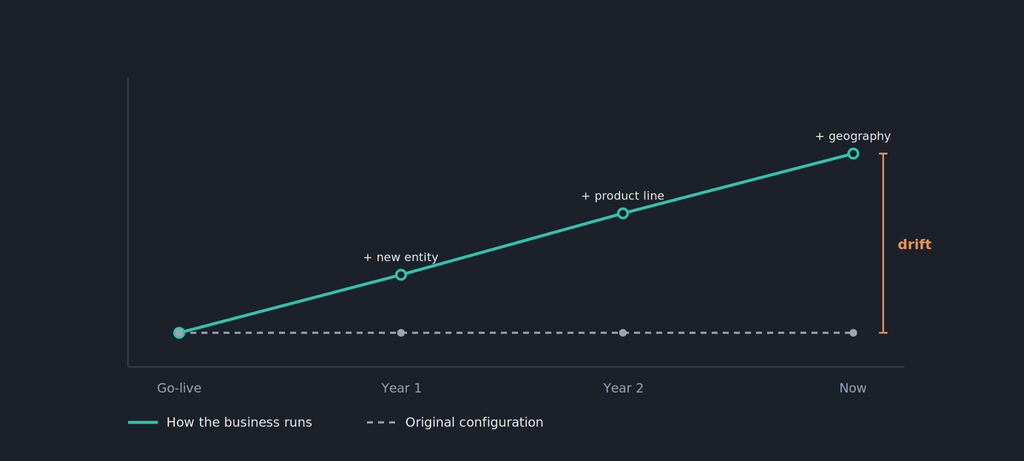
A NetSuite instance is configured against a point-in-time picture of how the business runs, accurate at go-live. As the business adds entities, products, cost structures, or geographies, the original configuration rarely keeps up. Reports then require manual adjustment before they can be used.
Consultants working in live NetSuite environments consistently see this pattern: the setup stopped keeping pace with the business, even though the platform can still handle the added complexity.
What a NetSuite Health Check Examines
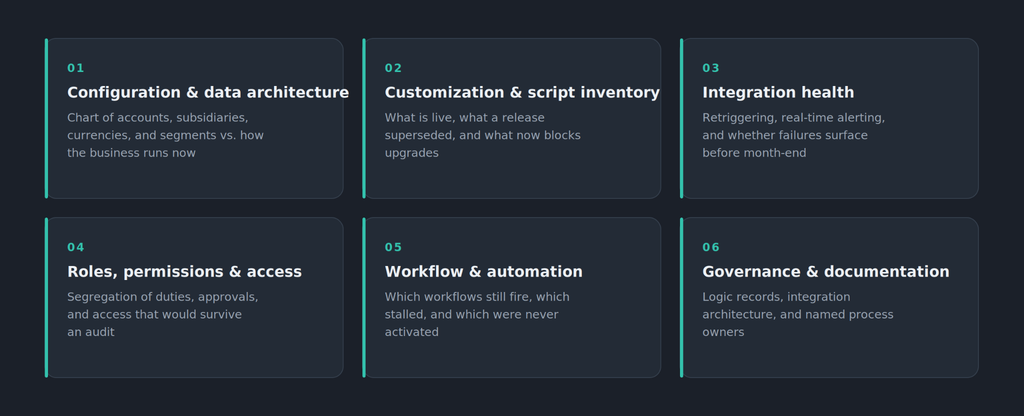
A thorough health check evaluates six functional domains, each measured against current rather than go-live requirements. It shows financial leadership, identifying when the instance is structurally sound and when it is not.
Before we take a look at what a health check involves, let’s go over the difference between a health check, a system audit, and an ongoing optimization engagement
These three terms describe three different scopes.
- A standard IT audit evaluates controls and access at a point in time, typically for compliance.
- An optimization engagement improves a functioning system.
- A health check precedes both, determining whether the foundation is sound enough to optimize or whether misconfiguration must be corrected first.
Now, let’s go deeper into what a NetSuite health check examines.
System configuration and data architecture: Does the setup still mirror the operating model?
The audit examines whether the chart of accounts structure, subsidiary configuration, currency settings, and segment definitions reflect how the business currently runs. For a company that has added legal entities since go-live, it checks whether OneWorld is consolidating or whether the controller still exports each entity into a quarterly spreadsheet.
When subsidiary settings and elimination rules are correct, OneWorld produces a consolidated statement inside NetSuite without a manual export. When they’re not, the health check documents which settings are missing and what it takes to move consolidation back inside the system.
Customization and script inventory: what was built, what is now dead weight, and what is blocking upgrades
Prior partners frequently build customizations to cover requirements that the implementation did not fully deliver. Over time, those accumulate: some are still in use, some were superseded by a NetSuite release that delivered the same capability natively, and some now block the instance from taking updates. Advanced modules like revenue recognition are a common example, scripted around rather than configured. The health check inventories what exists, what it does, and whether it should stay, be replaced, or be retired.
Integration health and data-flow integrity: whether failures surface in real time or at month-end
Silent integration failures are the leading reason companies switch NetSuite partners. An integration that drops records without alerting anyone turns the month-end close into a forensic investigation. The health check examines whether integrations have retriggering logic and real-time alerting, and whether failures are caught when they occur. It also checks whether the architecture matches the volume and complexity of the data flows it handles.
User roles, permissions, and access controls: security posture and segregation of duties
Role configurations accumulate over time and often exceed the access required by the role, and new employees are frequently onboarded into roles built for different functions. The health check checks whether segregation-of-duties requirements are met across the procure-to-pay and order-to-cash cycles, and whether sensitive transactions require the right approvals. The last question is whether the access-control structure would survive an audit.
Workflow and automation performance: where automated steps have stopped firing or were never activated
Workflows degrade without active maintenance. A workflow that fired correctly at go-live may stop after a customization changes a field it depends on, or after a process change bypasses the trigger. The health check identifies which workflows are active, which have stopped processing, and which modules were scoped originally but never configured to produce reliable automation.
Governance, documentation, and process alignment: what the prior partner left undocumented and who owns it now
Missing documentation is a frequent issue when a company transitions from one NetSuite partner to another. Customizations with no logic record, integrations with no architecture record, and workflows with no process owner create operational risk that the current team cannot quantify. The health check surfaces the documentation inventory and establishes what governance is missing.
Remediation or Optimization: How the Findings Determine the Next Step
This is the decision the audit exists to inform. Once the findings are documented, the question is no longer what is wrong with the instance, but which kind of work corrects it and in what order.
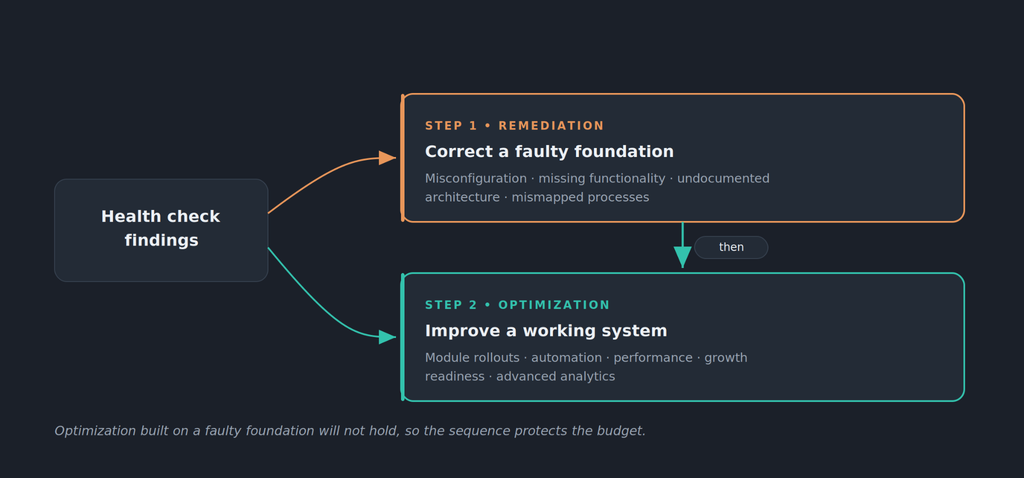
Health check findings are sorted into two structurally distinct categories: remediation and optimization. The right starting point sets the scope, timeline, and budget before any recommendation reaches the CFO’s desk.
Here are the differences between each step.
Remediation: correcting misconfigurations, missing functionality, and undocumented architecture
Remediation corrects the foundation without replacing the system: it documents what already works, isolates what is blocking reliable output, and fixes the misconfigurations and process-mapping errors before optimization begins. The NetSuite Remediation practice at Bring IT is built for this pattern, auditing what was built, documenting what was left incomplete, and closing the distance between what was promised and what was delivered.
Optimization: improving performance and coverage on a foundation that already works
Optimization improves a system that already works. The goal is to align NetSuite more closely with current operations, improve performance, prepare for growth, and increase return on investment. Optimization is appropriate when the health check confirms the foundation is sound and the remaining work is additive.
Use this table for a quick overview of each step. Then take a look at the decision matrix below to help you choose the right starting point.
| Remediation | Optimization | |
|---|---|---|
| What it addresses | A faulty foundation: misconfiguration missing functionality, undocumented architecture, incorrectly mapped processes | A functioning system: performance improvements, automation expansion, better coverage of existing features |
| When it applies | Reports are unreliable or manual; integrations fail silently; users rely on spreadsheets; the system does not reflect the operating model | The system works correctly at current scope; the goal is better automation, improved performance, or readiness for growth |
| Typical scope | Fixing misconfigurations, rebuilding architecture that does not support operations, establishing documentation and system logic, correcting process mapping | Module rollouts, workflow improvements, custom-report builds, integration upgrades, advanced analytics |
| Sequencing | Must precede optimization; optimization built on a faulty foundation will not hold | Appropriate after the foundation is verified to be sound |
Most environments produce findings in both categories, and deciding which one comes first is the practical question a health check must answer.
The assessment decision matrix to determine the right starting point
Each row maps an observable indicator to the starting point it signals, so finance leaders can place a live instance against it.
| Indicator | Points to |
|---|---|
| Reports require manual adjustment before use | Remediation |
| Users rely on spreadsheets for work the system should handle | Remediation |
| No documentation exists for customizations or integrations | Remediation |
| Integration errors surface during reconciliation rather than at the moment of failure | Remediation |
| System is stable; goal is better automation and module coverage | Optimization |
| System is stable; company is preparing for geographic or entity expansion | Optimization |
Both approaches are often necessary, and targeted remediation frequently lays the groundwork for later optimization.
How Bring IT’s Health Check Translates Findings into a Remediation or Optimization Roadmap
Bring IT’s health check produces a prioritized findings report organized by domain severity, assigns effort estimates and owners to each item, and maps each item to Bring IT Care managed services. The relationship that starts with the audit carries forward through its four phases: stabilization, adoption, automation, and optimization.
What the findings report covers and how findings are classified by severity
The findings report documents the current state of each domain and classifies each finding by severity:
- Must-fix findings: items that must be corrected before the system can produce reliable outputs.
- Risk findings: items that degrade performance or create operational risk but do not stop the system from running.
- Improvement opportunities: items that can be addressed in a planned optimization cycle.
The report supports the internal conversation finance leadership needs: whether the instance requires remediation before optimization, and what that work involves.
From findings to a structured action roadmap with owners and timelines
Each finding maps to an action item with an owner, an effort estimate, and a sequencing recommendation. Consider a company already live on NetSuite. A health check finds that five Manufacturing Execution System (MES) integration flows run through a middleware layer that adds cost and latency without benefit. Nobody documented how the middleware was configured, and the prior partner left the integration architecture without a record.
The integration-health findings give the team an audited inventory of what each flow does, what it costs to maintain, and whether the middleware layer is necessary.
Each of the five flows is then evaluated for point-to-point migration through RESTlets. The architecture decision is set in the roadmap rather than discovered mid-project. Each replacement ships with retriggering logic and real-time alerting, so failures surface before reconciliation. One leading food manufacturing company cut approximately $40,000 per year in middleware cost across five such flows, at roughly $8,000 per flow.
How Bring IT Care holds the engagement open after the audit closes
A health check that produces a findings report and then closes is not a managed relationship. Its value is in what happens after the roadmap is set.
Bring IT Care runs as a four-phase progression: stabilization, adoption, automation, and continuous optimization. It starts at 20 hours per month and sits at Level 3, above NetSuite Advanced Customer Support (ACS) and Premium Support rather than replacing them, reaching the advanced module rollouts, complex integrations, and new-country expansion those support tiers do not cover. The health check is the entry point; Bring IT Care keeps the instance aligned to the business as both evolve.
Building the Case for Action Before the Next Close Cycle
A completed NetSuite health check gives finance leadership a domain-by-domain account of where the instance stands and a classified list of remediation and optimization items. For companies that have lived through a prior partner relationship that went quiet or a go-live that delivered less than the original scope, that is the evidence they need to act.
The next step is a scoped remediation engagement or an ongoing Bring IT Care arrangement that turns the findings into a system aligned to how the business runs today.
Contact Bring IT for a NetSuite health check scoping conversation.
Frequently Asked Questions
Does a NetSuite health check produce documentation we can hand to auditors?
Yes. The governance and documentation domain reconstructs what a prior partner left unrecorded: customization logic, integration architecture, workflow ownership, and the access-control structure across the procure-to-pay and order-to-cash cycles. That inventory is what an external audit asks for and what an undocumented instance cannot produce on demand.
How is the cost and effort of a remediation estimated?
A remediation does not carry a single fixed price, because the scope depends on what the audit finds. The findings report assigns each item a severity level and an effort estimate, which is what a scoped quote is built from. That lets finance leadership weigh the effort behind each item and decide what to sequence before committing budget.
How long does a NetSuite health check typically take, and will it require system downtime?
Health check engagements typically span several weeks, depending on the complexity of the environment and the number of customizations and integrations in scope. The audit is a read-only review of configuration, scripts, integrations, roles, and workflows. It does not require system downtime or changes to the live environment.
How often should a live NetSuite instance be formally reviewed?
A formal review every one to two years is a reasonable guideline for a stable instance. Companies that have recently added entities, migrated from a prior partner, expanded into new geographies, or rolled out new modules should review sooner. Integration-heavy environments benefit from more frequent review, because integration failures accumulate faster than configuration drift.
What should finance leadership do if the prior implementation partner is no longer reachable and integrations are undocumented?
Start with a documentation audit: catalog what customizations and integrations exist, what they are designed to do, and whether they function correctly. Undocumented integrations in production carry operational risk that cannot be quantified without that inventory. A health check produces that documentation and classifies each item by severity, so the work is scoped from actual findings rather than assumptions about what the prior partner built.