Your dashboard refreshed five minutes ago, but some transactions are still waiting to reach NetSuite. How current are the numbers you are using to make decisions?
For finance teams managing multiple entities and systems, a recent refresh does not necessarily mean the report is complete. Transactions may still be awaiting approval, integrations may be delayed, or the dashboard may be displaying cached results.
Real-time financial reporting starts with understanding those differences. This article explains where reporting delays occur, how NetSuite’s reporting and analytics options differ, and how to identify whether your business needs better configuration, more reliable integrations, or additional reporting capabilities.
Key Takeaways
- Real-time reporting provides access to current recorded data, but it does not mean the figures are reconciled or ready for final financial reporting.
- Delays can occur in source systems, approvals, integrations, data processing, and report refreshes.
- A recently refreshed dashboard can still exclude missing or unprocessed transactions.
- Native NetSuite reporting, NetSuite Analytics Warehouse, and other analytics platforms serve overlapping needs. The right choice depends on data sources, reporting complexity, and required freshness.
- Evaluate timeliness and accuracy separately. Faster updates do not automatically make financial information more reliable.
What Real-Time Financial Reporting Actually Means
Real-time financial reporting makes current recorded transactions available for reporting without waiting for a scheduled data load. However, the figures shown still depend on what has reached the system, what has been posted, and how the report retrieves its data.
A transaction recorded in an external sales system may not yet appear in the ERP. A posted transaction may still require reconciliation or adjustment. A dashboard may display cached results until it refreshes.
When evaluating a solution, ask what “real-time” refers to: the original business event, posting to the ledger, or the latest report refresh. Those are different points in the reporting process.
How Real-Time Financial Reporting Works
Between a transaction happening and a finance leader reading about it, the data changes hands several times. Each handoff can add time, and only the last one is visible in the report itself.
A sale rings up in a point-of-sale system. A production run closes on the shop floor. Neither event sits in the general ledger yet. Something has to move it there, and the schedule that something runs on sets the floor for how current any downstream report can be.
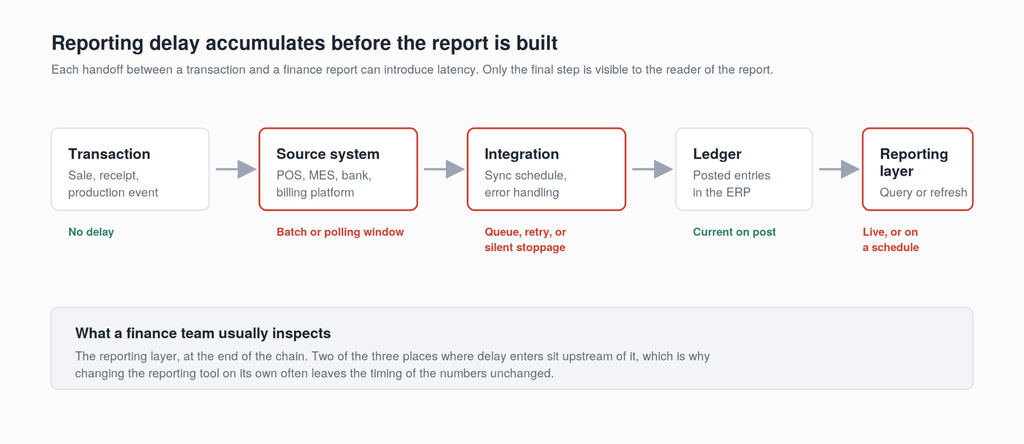
Once transactions post to the ledger, they become available to reporting tools according to the tool’s configuration, filters, permissions, and refresh behavior. That does not establish that every expected transaction has arrived or that reconciliation is complete.
Some reports query current transactional data. Others use cached results or data copied into an analytics platform. Each approach can serve a useful purpose. The right design depends on how fresh the information needs to be, how much processing it requires, and which systems hold the necessary data.
Real-Time Reporting Versus Batch Reporting
Real-time reporting queries current recorded data when a report runs. Batch reporting updates data or produces outputs on a defined schedule, which may run several times a day, overnight, or less frequently. Batch processing does not necessarily wait until month-end, and neither approach guarantees accuracy on its own.
Near-real-time reporting uses frequent updates with a short delay between the source event and its appearance in the report. The acceptable delay depends on the decision being made. A cash-management decision may require fresher information than a monthly performance review.
Define that requirement before selecting a platform. Consider the full journey from transaction capture and approval through integration, posting, processing, and display. Refreshing a dashboard more often cannot compensate for transactions that have not yet reached the underlying system.
Where Financial Reporting Delays Can Occur
Reporting delays can originate in several places: transaction entry and approval, integrations, data quality, configuration, processing, and the reporting tool itself. Reviewing the full reporting process helps distinguish between information that arrives late, information that is incomplete, and information that takes too long to retrieve or present.
Integration Delays and Missing Records
An integration does not have to stop completely to create a reporting problem. It may process some records while rejecting others, run later than expected, or receive no data from a source that should be active. A successful job status alone does not prove that every expected transaction arrived.
Monitoring should check both technical execution and business completeness. Useful controls include failed-record alerts, comparisons of source and destination totals, and notifications when expected data does not arrive.
Recovery also depends on the type of failure. Temporary connection issues may be suitable for automatic retries, while invalid data or mapping errors may require investigation. Retry logic should prevent duplicate transactions, and unresolved issues should have a clear owner.
Bring IT supports integration architecture connecting NetSuite with other business systems. Monitoring, recovery procedures, and support responsibilities should be defined as part of the agreed solution and service scope.
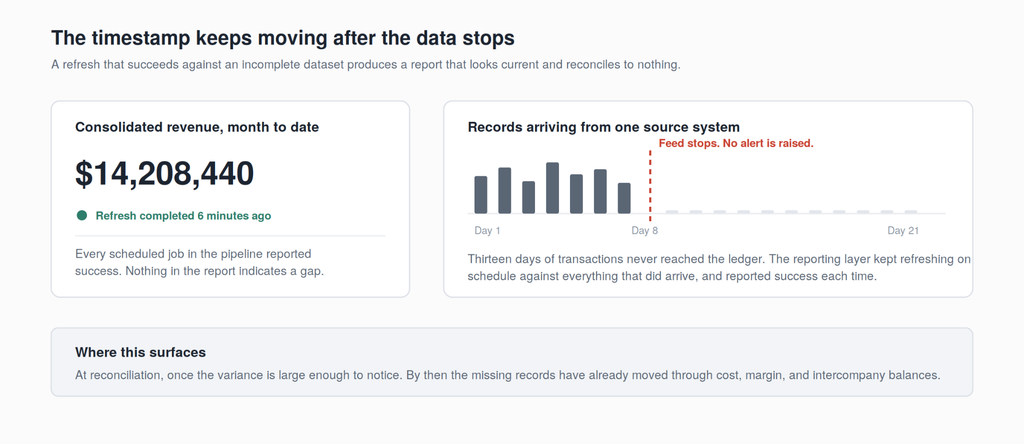
By the time the variance is large enough to notice at reconciliation, the missing records have already moved through cost and intercompany balances. Correcting three weeks of downstream effects is a different job from catching one failed sync.
Bring IT builds error handling into the integrations it delivers. Every flow retriggers automatically when a delivery fails. When a feed goes quiet, an alert reaches a named person who can act on it, while the problem is still one day old.
The underlying integration architecture carries as much weight as the alert system. A multi-entity food manufacturer running 10 legal entities moved five production flows into NetSuite from middleware onto point-to-point connections. Every failure now names the flow that broke it, so the finance team resolves it the day it happens and closes on numbers it can reconcile the first time around. The rebuild also took roughly $40,000 a year out of middleware licensing.
Configuration and Data Quality
As a business adds entities, locations, and reporting requirements, its original NetSuite configuration may need to evolve. Account structures, subsidiaries, departments, classes, locations, and custom segments all influence how finance can organize and analyze results.
Manual spreadsheet work can signal a configuration gap, but it may also reflect a reporting requirement, missing data, or a report that has not yet been built. Review the specific need before deciding whether to change the chart of accounts or add another tool.
Migration decisions can also affect reporting. Areas to investigate include:
- Account mappings that do not support the intended financial presentation.
- Missing segment values needed for historical comparisons.
- Opening balances that do not reconcile to the supporting detail required by the migration approach.
- Legacy fields or historical records needed for reporting but excluded from the agreed migration scope.
Not every implementation requires all historical transactions or custom fields to be migrated. The important question is whether the agreed data scope supports the reports the business needs and whether the loaded data has been validated.
Reporting Options for NetSuite Environments
Native NetSuite reporting, NetSuite Analytics Warehouse, and other analytics platforms can work together. Their capabilities overlap, so the choice should reflect the reporting requirement rather than a fixed division between operational and analytical questions.
Native NetSuite Reporting
Standard reports, financial reports, saved searches, and SuiteAnalytics Workbook provide access to data held in NetSuite. They can support both day-to-day financial visibility and analysis.
Check how each view retrieves and refreshes its results. SuiteAnalytics Workbook supports real-time and cached response modes, and dashboard freshness should not be assumed from the time the page was opened. Filters, permissions, posting status, and refresh settings also affect what users see.
NetSuite Analytics Warehouse
NetSuite Analytics Warehouse combines NetSuite data with historical information and supported external data sources for broader analysis. It can help teams explore trends and connect financial results with operational information.
Its data is loaded and processed through pipelines rather than queried directly from the live NetSuite ledger. Refresh timing depends on configuration, data volume, processing, and the refresh options available for the relevant datasets. Confirm the supported frequency and actual completion time for the reports you need.
Other Analytics Platforms
Platforms such as Domo can also combine NetSuite data with information from other business systems. Freshness depends on source availability, connector schedules, transformations, and dashboard refresh behavior.
An external data source does not automatically require a separate BI platform. Evaluate whether native reporting, NSAW, another analytics platform, or a combination best meets the requirement.
| Reporting option | Data freshness | Data coverage | Example uses |
|---|---|---|---|
| Native NetSuite reporting | Depends on posting status, report execution, and caching or refresh settings | Data available within NetSuite | Financial statements, receivables, transaction analysis |
| NetSuite Analytics Warehouse | Depends on pipeline schedules, processing, and supported refresh options | NetSuite, historical, and supported external data | Trends, financial and operational analysis |
| Other analytics platforms | Depends on connectors, processing, and display settings | Connected NetSuite and external sources | Combined business metrics and cross-system analysis |
Evaluate the time from the source transaction to the displayed result. A quickly loading dashboard and a frequently updated dataset are different measures of performance.
How to Choose Real-Time Financial Reporting Software
Start with the decisions finance needs to make. For each reporting requirement, identify the necessary data, where it lives, how current it must be, and which controls are required before users can rely on it.
Then assess whether the existing NetSuite configuration and reporting tools can meet that need. Some gaps may be resolved through report design, training, or configuration. Others may require integration changes, additional analytics capabilities, or a different approach to preparing and managing data.
Compare options against the same requirements: data coverage, refresh timing, reporting complexity, traceability, permissions, ongoing maintenance, and total cost. Ask vendors to demonstrate the proposed solution using representative business scenarios.
Bring IT’s Data Services practice supports integration, migration, analytics, and data governance for NetSuite environments. Its role is to help align the reporting architecture with the organization’s business needs. Any assessment, implementation, or ongoing support should have a clearly agreed scope.
Where to Start Fixing Reporting Delay
Choose one report that regularly arrives late or requires manual correction, then work through four questions:
- Where does the required data live? Identify the source systems and check whether the necessary records and fields are available in NetSuite or the analytics platform.
- When does the data become available? Trace transaction entry, approval, integration, posting, processing, and display. Check refresh timestamps and whether the report uses cached results.
- How do you confirm completeness and accuracy? Review reconciliations, missing-record checks, mappings, report filters, and ownership of exceptions.
- What manual work remains, and why? Determine whether spreadsheet steps address missing data, reporting design, accounting adjustments, or additional analysis.
These checks help define the problem before selecting a solution. The next step may involve process changes, configuration, integration improvements, or additional reporting capabilities.
Want to know where the delay is entering your chain? Contact Bring IT for a reporting architecture review.
Frequently Asked Questions
Does real-time financial reporting replace the month-end close?
No. Current transaction data does not remove the need for reconciliations, accruals, adjustments, intercompany eliminations, and review. Better visibility can help teams identify issues earlier, but final financial statements still depend on completing the relevant close activities and controls.
Does real-time financial reporting require additional NetSuite licensing?
Your existing NetSuite environment may already provide the reporting capabilities you need. Confirm the features, permissions, and access available in your account before purchasing additional tools. NetSuite Analytics Warehouse is an add-on, and other analytics platforms or connectors may involve additional fees. Licensing and implementation requirements depend on the proposed solution.
Can real-time reporting work if subsidiaries run on different systems?
It can, but the freshness and completeness of the combined view depend on how each system captures, approves, and shares its data. Consistent mappings, reporting definitions, and appropriate consolidation processes are also necessary. Standardizing on one ERP is one option; improving integrations or using a shared reporting platform may also meet the business’s needs.
What does fixing reporting latency typically cost?
There is no single price because the work can range from changing a report’s settings to redesigning integrations or preparing historical data. An assessment should define the cause, required changes, testing, and ongoing support before estimating cost. Compare the full scope, including any additional subscriptions.
How quickly can reporting latency be resolved after go-live?
Timing depends on the cause and the changes required. A refresh-setting or report-filter issue may be resolved quickly, while integration changes or historical data corrections can require more investigation and testing. Agree on a timeline after assessing dependencies and validating the proposed fix in an appropriate test environment.