Every purchase a company makes runs through the same sequence. Someone requests it, someone approves it, an order goes out, goods arrive, an invoice follows, and a payment clears. In most companies, that sequence runs on a mix of systems, inboxes, and habits. The steps still happen in order, but the record of them arrives late. Finance learns what was committed only when the invoice shows up, turning month-end into reconstruction rather than reporting.
Procure-to-pay automation moves that sequence into a system that enforces the rules at each handoff. Most finance teams automate the last two stages first, which is why so many end up with faster invoice processing and no better control over spend.
This article goes deeper into what procure-to-pay automation is and the six steps for building it. It then works through what the finished cycle looks like in practice, the technology behind each stage, and the returns finance teams see.
Key takeaways:
- Procure-to-pay spans six stages, from requisition through payment. Automating the downstream half alone leaves the spend control problem untouched.
- The build order matters. Purchasing controls come first, matching and capture last, because capture accuracy cannot compensate for purchase orders that nobody was required to raise.
- Most of the cycle runs natively in ERP. NetSuite covers requisitions, approval routing, three-way matching, bill capture, and payment execution without a third-party layer.
- Four conditions justify additional software: invoice volume, entity and currency count, approval chain depth, and invoice format variance.
- The measurable returns are accruals generated by the system rather than estimated, committed spend visible before the invoice, and a close duration finance can forecast.
What Is Procure-to-Pay Automation?
Procure-to-pay automation applies system-enforced rules across the entire purchasing cycle, from the moment a department requests an item to the moment a vendor is paid. The name describes a chain rather than a single process, and that distinction matters. Procurement raises the request, operations receives the goods, and finance pays the bill, so no single function owns the cycle end-to-end. Every handoff between them is a point at which data can stop moving, and control can lapse.
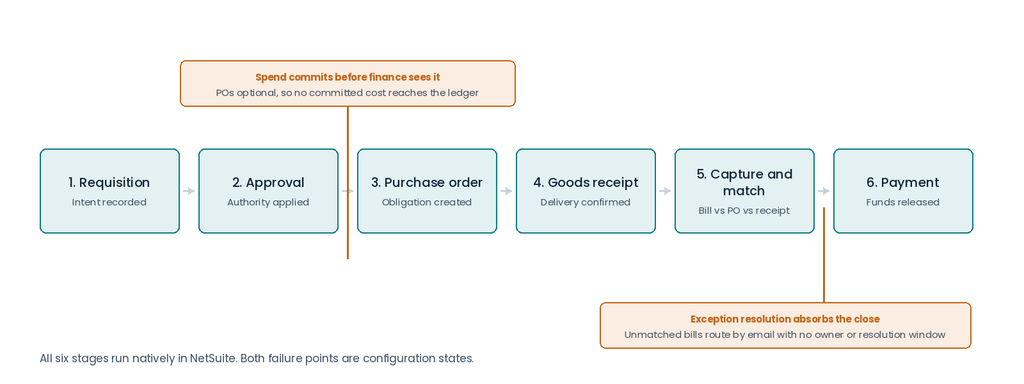
The cycle runs in six stages: requisition, approval, purchase order (PO) issuance, goods receipt, invoice capture and matching, and payment execution.
In procure-to-payment automation, each stage passes structured data to the next, and each transition carries a rule that the system applies rather than having someone do it manually. A requisition exceeding a threshold automatically routes to a second approver. An invoice that does not match its PO stops rather than posting.
Where it differs from accounts payable automation
Accounts payable automation covers the downstream half: capture, matching, approval, and payment. Procure-to-pay extends upstream to the requisition and the purchase order, where authorization actually occurs.
The distinction has a financial consequence. Spend commits at the approved purchase order, not at the invoice. When approved POs reduce available budget as they are issued, finance can see committed costs throughout the period rather than waiting for invoices to arrive. As goods are received, those receipts provide the transaction data needed to recognize accrued purchases before vendor bills are entered.
Where purchase orders are optional, finance has no committed-cost position to work from, and the first signal of an obligation is the receipt or the invoice.
Oracle and its partners score process maturity during discovery using the NetSuite Value Chain Assessment. Its baseline Manual state for Procurement and Expense Management indicates no visibility into committed expenses and no formal purchasing controls. Correcting that state is what the six steps below are intended to do.
How to Automate Procure-to-Pay in Six Steps
The order below runs from upstream to downstream. Teams that reverse it start with invoice capture, where the most immediate issues occur. That speeds up the processing of spend no purchase order was ever required to authorize. Here are the six steps to automate the procure-to-pay process.
Step 1: Map where spend commits currently
Trace a recent purchase from request to payment, and record where each decision was made and by whom. Usually you’ll find that authorization was via email or a conversation, and the system recorded the outcome afterward. That distance between decision and record is what the remaining steps close.
Three numbers make it scopeable. Each answers a different question about the current state, and together they show whether the work ahead is a short configuration project or a longer program. All three come from data the ERP already holds, so the count takes hours rather than weeks.
- Count what share of vendor bills arrive with no purchase order behind them, which measures how much spend is uncontrolled. Anything above a few percent means the committed-cost balance is incomplete, so every budget report during the period understates what has been spent. This number also predicts how much resistance Step 2 will meet, because each of those bills represents a buying habit that has been working fine for someone.
- Against that, set the share failing matching, because those are the bills that the close waits on. A rate near the 14% average is normal. What matters more is the reason behind the failures, whether prices drift from contract, receipts go unrecorded, or purchase orders are raised after the goods arrive. Each cause points to a different step below.
- Then find the average age of an unresolved exception. That last number reveals whether the queue has an owner in practice, whatever the process document says. Anything past a few days means resolution is happening at close rather than as exceptions appear, which is what makes close duration unpredictable. Aging spread across many owners is a routing problem, while aging concentrated on one is a capacity problem.
Track this across two or three departments rather than one. Purchasing behavior tends to vary more by function than by company, and the department that already raises purchase orders will not surface the problem.
Step 2: Make purchase orders mandatory and add pre-commitment budget controls
A purchase order only becomes a control when the system refuses to process a bill without one. Where raising a PO is left to the buyer’s discretion, it documents what was already decided instead of governing what can be decided. A governed configuration requires a PO before a vendor bill can be processed, and checks the request against an available budget balance before approval proceeds. Bills that arrive without a matching order are held rather than posted.
This is the step that produces committed-cost visibility, and it is also the step with the most organizational friction. Requiring POs means telling departments they can no longer order directly, which is a policy decision before it is a technical one.
Step 3: Build approval routing that matches the current org structure
Approval workflows evaluate transaction amount, department, subsidiary, and custom criteria. A purchase below a defined threshold can be approved automatically. One above it routes to a manager, then to a director, with escalation logic where an approver is inactive.
Routing built at go-live reflects the organization as it existed then. Reorganizations, acquisitions, and new entities change who holds authority, and workflows that were never revisited either stall on former approvers or pass transactions through unchecked.
Step 4: Turn on three-way matching and set tolerances
Three-way matching compares the vendor bill against the purchase order and the item receipt. Where all three agree within tolerance, the bill advances without intervention. Any mismatch surfaces as an exception, with the specific variance identified.
Tolerances need to be set deliberately. A tolerance set too tight floods the exception queue with routine freight and rounding variances nobody needs to see. One set too loose stops the control catching the discrepancies it exists to find.
Most teams set separate tolerances for price and quantity, and separate thresholds by value band. A small variance on a low-value bill then clears automatically, while the same percentage on a large one stops for review.
Step 5: Assign exception ownership before automating capture
Matching creates exceptions by design, and the volume is material. Ardent Partners’ AP Metrics That Matter in 2025 report invoice exception rates averaging near 14%, against a best-in-class benchmark near 9%. On a few thousand bills a year, that’s several hundred items needing a human decision.
An exception queue with no named owner and no resolution window accumulates. Nothing accrues against those bills until they clear, so the close waits on however long the queue takes.
A configured exception workflow assigns an owner the moment the exception is created, sets a resolution timeframe, and escalates when that window passes. Teams that skip this step find that automation increases the volume of unresolved items rather than reducing it.
Step 6: Automate capture and payment last
With clean purchase order data upstream, capture has something reliable to match against. Optical character recognition and machine-learning extraction pull values from vendor bills, and scheduled payment runs execute against approved and matched bills.
Running this step first is the common error. Capture accuracy cannot compensate for purchase orders nobody was required to raise.
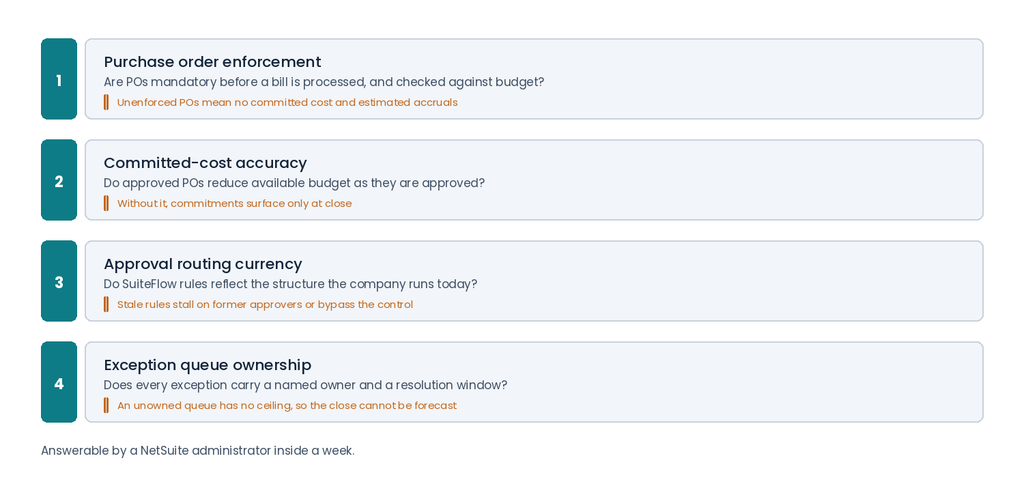
Six steps, run in order, take a cycle from unenforced to governed. What that takes in practice depends on the systems already in place, and on how much of the work those systems can do without help.
What Procure-to-Pay Automation Looks Like in Practice
The steps above describe a target state. Two companies reach it from different starting points.
A full deployment during ERP migration
Grover Gaming, an electronic gaming software and design company, migrated from Sage and deployed Advanced Procurement alongside Advanced Financials, Demand Planning, Advanced Inventory, and WMS. The evaluation was run jointly by the finance, procurement, and logistics teams, which meant purchasing controls were scoped alongside the financial close rather than after it.
Over 80% of manual business processes were automated, and the company saw a full return on investment in under six months. Implementing the procurement layer during the migration phase avoided the common sequence of deferring purchasing controls to a later stage that often lacks funding.
Completing a cycle that was built halfway
The more common starting point is an ERP instance carrying three of the six stages. Three-way matching is switched on and working. Purchase orders exist as a transaction type but were never made mandatory, approval routing reflects an org chart from go-live, and the exception queue has grown without an owner. The controller runs each close on estimated accruals while holding a license for the automation that would generate them.
Completing that build follows the same order as a new one, starting at Step 2. Purchase order enforcement gets switched on and tied to budget checking, which is the change that produces committed-cost visibility and the change departments feel. Approval routing is rebuilt against the current entity and role structure. Exception ownership and resolution windows are configured before anyone touches capture settings.
The work sits inside NetSuite Optimizations where modules were never fully configured, and NetSuite Remediation where a prior implementation left the cycle unfinished. Neither is a reimplementation, and both typically run in weeks. The result is the same cycle Grover Gaming deployed at migration, reached in stages by a company that already owns the license.
The Technology Behind Each Stage
Most of the six-stage cycle runs inside the ERP. The categories below describe what goes where and which conditions call for something additional.
What most ERPs already cover
Requisitions, approval routing, purchase order management, three-way matching, and payment execution are standard functions in mid-market ERP platforms. Some ship them enabled, some require a module, and the differences that matter are in how much configuration each demands rather than whether the capability exists.
NetSuite is worth walking through in detail because Oracle documents its limits precisely, which most vendors do not.
Purchase requisitions carry configurable approval workflows, routing to a named approver, a role, or a sequential chain before a PO is generated. Budget checking evaluates requested spend against an available balance. Approved POs reduce that balance, which keeps the committed-cost position current.
SuiteFlow, the native workflow engine, carries the approval chains described in Step 3, and three-way matching runs against bill, PO, and receipt without a third-party tool.
Bill Capture handles extraction. It automatically reads key values from vendor bills, and its suggestions improve as users correct them. Oracle’s documentation names the underlying engine as the Oracle Cloud Infrastructure Document Understanding Custom Generative Model. Bills arrive by upload or email in PDF, JPEG, or PNG format.
A documented limit is worth knowing. Serial and lot-numbered items, bins, and inventory status are not supported on standalone bills without an associated purchase order, which matters for inventory-heavy manufacturers and distributors.
One distinction gets blurred across most procurement software content. Oracle states directly that three-way matching, approval workflows, and SuiteApprovals are separate functions that Bill Capture neither includes nor affects. Capture is one of six stages, and evaluating platforms on extraction accuracy alone represents only a fraction of the cycle.
When an additional layer is warranted
Four conditions push past what native capability covers.
- Invoice volume. Native capture carries per-email file count and size limits documented by Oracle. Organizations processing thousands of invoices daily exceed them.
- Entity and currency count. Multiple currencies, country-specific tax compliance, and cross-border payment requirements across several jurisdictions exceed the native payment layer.
- Approval chain depth. Multi-tier chains are representable in workflow, but deeply nested intercompany logic across 20 or more subsidiaries becomes difficult to maintain in a single configuration.
- Invoice format variance. EDI transactions, vertical-specific documents, and supplier portal invoices need format-specific handling.
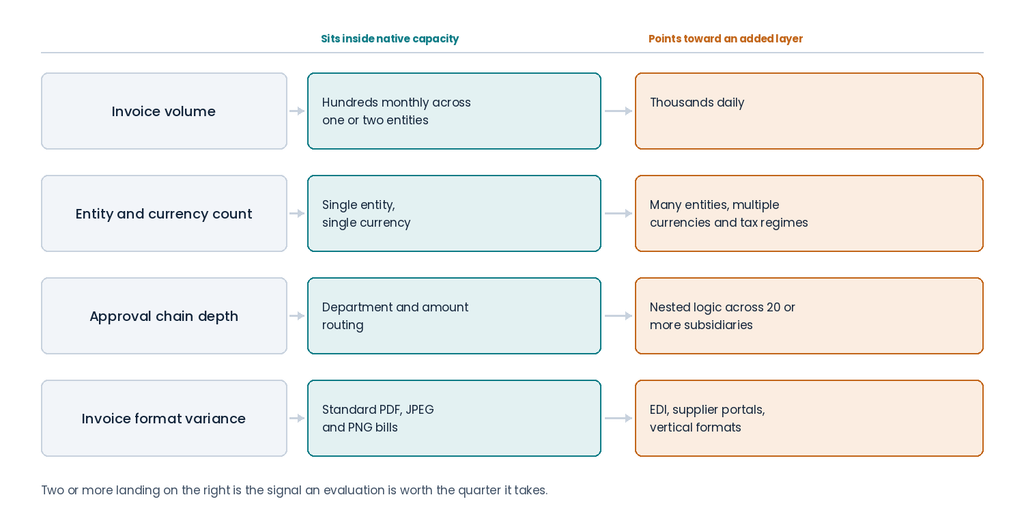
Two or more criteria landing on the right is the signal that an evaluation is worth the quarter it takes. One on its own is usually a configuration question.
The integration decision that follows
Where an additional layer is warranted, the integration architecture determines whether it holds up. Celigo handles pre-built connector flows, Boomi covers EDI and custom logic, and point-to-point RESTlets suit high-frequency, well-defined flows where middleware adds cost without benefit.
Bring IT settles that decision before the statement of work is signed, and specifies retriggering and alerting on every flow. A dropped record then raises an alert the same day rather than surfacing as a variance three weeks later during reconciliation. That specification belongs in the statement of work rather than in a post-go-live backlog. Error handling written after the connector is live tends to stay unwritten, because the flows appear to work until the first failure, and by then, the project team has moved on.
Bring IT holds no procure-to-pay or accounts payable software license, which is why its assessment of native coverage against an added layer carries no commercial preference.
The Returns Finance Teams See with Procure-to-Pay Automation
The returns below show up in a close rather than in a projection.
- Committed spend becomes visible before the invoice. Approved purchase orders reduce available budget as they are issued, so the CFO sees obligations as they are created rather than as they arrive. Budget conversations shift from explaining variances to preventing them.
- Accruals come from the system rather than from estimates. With receipts posting accruals and exceptions resolved inside the system, period-end accruals are produced from transaction data. That removes the estimation step that draws auditor questions and the restatement risk that follows it.
- Close duration becomes forecastable. An exception queue with named owners and resolution windows has a ceiling. Finance can plan around a close that takes a predictable number of days.
- Exception volume falls rather than moving. Invoices fail matching for upstream reasons: incomplete PO data, unrecorded receipts, or pricing that drifted from contract. Fixing those causes reduces the queue, where capture automation alone would only process the same exceptions faster.
- Contract pricing gets enforced at the point of purchase. Vendor records hold historical pricing, and contract terms applied at PO creation make off-contract purchases visible before they arrive as invoices.
- Finance capacity shifts from processing to control. A mature finance function moves from hunting data to managing exceptions, and the hours released by the four returns above are what fund that shift.
None of these arrive at once. They land in the order the controls were built, which is why the first close after a purchase order policy takes effect looks different from the fourth.
Which of the Six Stages Are Already Enforced in Your System
Automating procure-to-pay is an operational decision. The payment cycle runs in a fixed order; the controls have to be built in that order, and invoice capture depends on every upstream stage being correct. For a company already running an ERP, the first move is establishing which of the six stages carry enforced rules today and which were left at their defaults. That answer determines whether the work ahead is configuration, additional software, or both.
Ready to see what your current configuration covers?
Bring IT can review your NetSuite instance and map the distance between what was configured and what the cycle needs. Request a procure-to-pay assessment.
Frequently Asked Questions
How long does it take to automate procure-to-pay?
The timeline depends on which stages already carry enforced rules. A company completing an existing configuration, where matching works but purchase order enforcement and exception ownership were never set up, typically works in weeks rather than quarters. A full build alongside an ERP implementation runs with the wider project. The step that takes the longest is rarely technical. Requiring purchase orders changes how departments buy, and that adoption curve sets the pace.
Can procure-to-pay automation work without a purchase order for every transaction?
Some spend categories do not fit a purchase order, including utilities, rent, and certain recurring services. Those are handled through non-PO invoice workflows with their own approval rules and coding defaults, which keeps them under control without forcing a purchase order that serves no purpose. The distinction to make is between spend genuinely unsuited to a PO and spend that simply bypasses one.
Who should own the procure-to-pay configuration after go-live?
Ownership usually falls between functions, which is why configurations drift. Finance owns the control and the consequence, IT or the system administrator owns the workflow build, and procurement owns whether departments follow the process. A configuration holds when one named person reviews it against the current organizational structure on a set cadence, most practically after any entity addition, acquisition, or reorganization. Teams without that capacity internally place it with a managed services engagement rather than leaving it unassigned.
What has to be accurate before automated bill capture performs well?
Capture matches extracted values against existing records, so vendor, item, and purchase order data has to be current before extraction produces usable results. Captured bills are presented for review against the source document before creation, and accuracy improves as users correct suggestions. This is the reason capture belongs last in the build order rather than first.