Quick answer: Switching a role to NetSuite Next is a go live for those users, even though nothing is migrated. Hypercare is the short, structured period after the switch: a support team that separates real NetSuite Next issues from everything else, and expands access wave by wave only when the evidence says it is safe.
Key takeaways
- A NetSuite Next switch is a go live for users, even with no data migration.
- Compare every suspected issue with the same task in the current experience before calling it a defect.
- Plan around three business weeks after Wave 1, and expand, hold, or reduce access based on evidence.
- Hypercare ends when the exit criteria are met, not on a calendar date.
Without hypercare, early questions arrive as urgent messages with no owner, and the first wave quietly sets the tone for everyone who follows.
What makes NetSuite Next hypercare different?
After an implementation, almost everything is new. After a NetSuite Next switch, the data and configuration are the same and the experience is new. That means many reported issues turn out to be something else: an access setting, a defect that already existed, test data, a customization, or an unrelated release change.
The rule we use is simple. For every suspected NetSuite Next issue, compare the same task in the same account, release, role, subsidiary, form, record state, and time window. A difference is not automatically a defect. It becomes an incident when it creates an unacceptable business, control, access, or support outcome.
How long should hypercare last after enabling NetSuite Next?
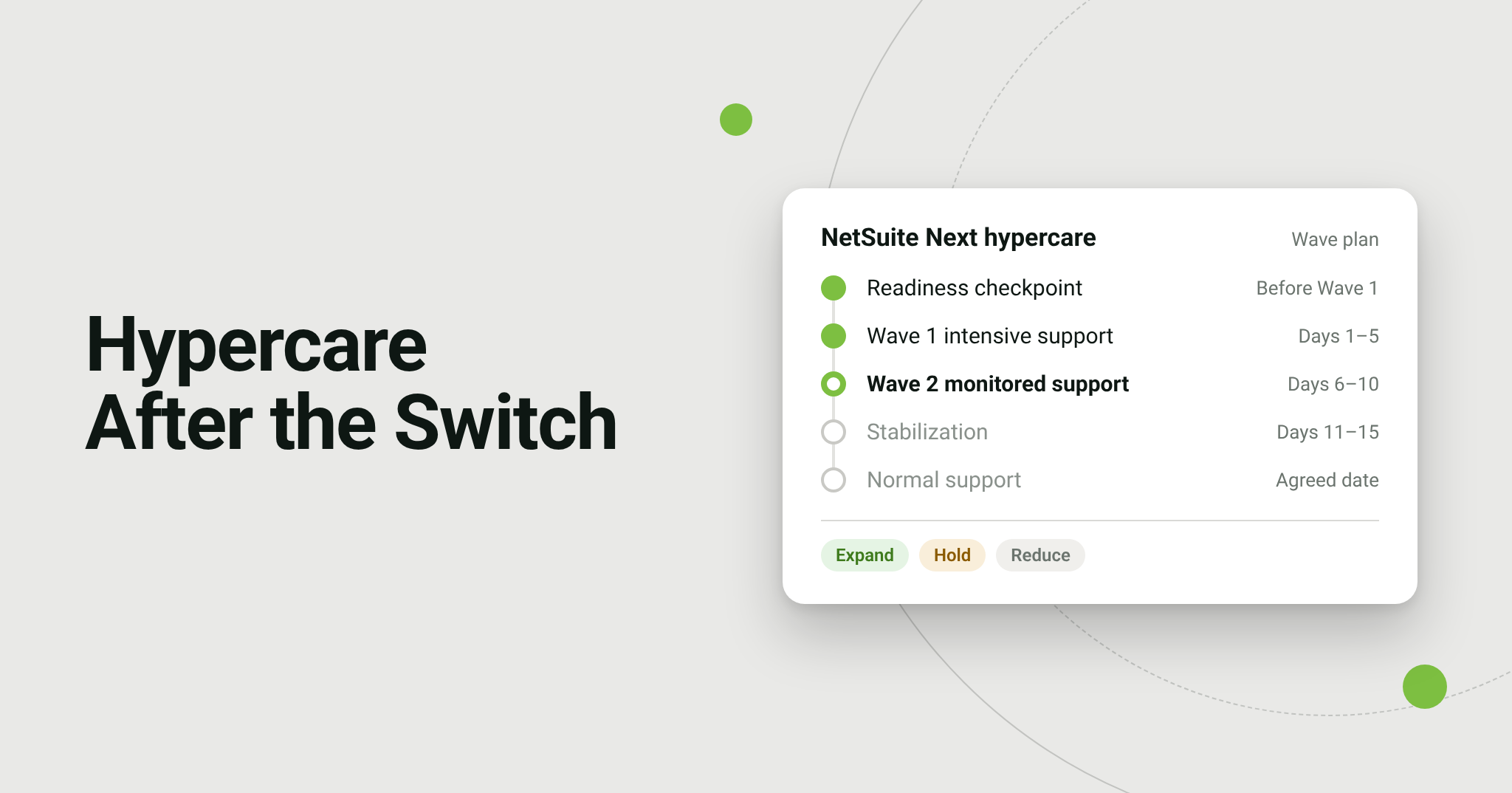
Our playbook plans about three business weeks after Wave 1, followed by an agreed transition date:
| Stage | Timing | Decision at the end |
Readiness checkpoint | 3 to 5 business days before Wave 1 | Authorize or delay Wave 1 |
| Wave 1 intensive support | Business days 1 to 5 | Expand, hold, or reduce access |
| Wave 2 monitored support | Business days 6 to 10 | Continue or extend hypercare |
Stabilization | Business days 11 to 15 | Begin the exit review |
Transition to normal support | Agreed date | Close hypercare |
Adjust the plan around period close, payroll, peak fulfillment, and major integrations. And do not end hypercare just because the planned date has arrived.
What should hypercare cover?
- NetSuite Next access, role eligibility, switching, and navigation differences.
- Ask Oracle access, prompts, skills, agents, protected actions, and checking answers against source records.
- Forms, scripts, workflows, saved searches, and vendor components used by the roles that switched.
- Integrations and scheduled processes connected to those roles’ work.
- Performance and usability issues that materially affect work, plus training gaps.
How do you support Ask Oracle users during hypercare?
When someone reports a wrong answer, start with the role. Ask Oracle answers within the signed in user’s permissions, so a user prompting as Administrator, or a colleague with a different role, will get a different answer. Then capture the exact prompt, any attached records or files, the skill or agent used, the effort level, and any interpretation note. Open the underlying record or report, compare the values, and use Show explanation to see the data sources.
Classify the result before acting on it: correct, incomplete, ambiguous prompt, data the role cannot access, inconsistent source data, unsupported task, or reproducibly incorrect. Several of these have nothing to do with the AI itself: the fix is a clearer prompt, a permission review, or a data correction.
For protected actions, review the proposed change before approving, decline anything broader than expected, and open the record afterward to confirm what happened. An approval that expired or was declined did not complete.
When should you expand to the next wave?
| Decision | When |
Expand | Required scenarios pass, no uncontained Severity 1 or 2 incident remains, integrations reconcile, and the support team has capacity |
| Hold | The risk is understood and contained, but more evidence or a fix is needed |
| Reduce | Affected roles go back to their previous access because business, control, or support risk exceeds the agreed threshold |
Do not judge health by ticket count alone. A quiet queue can mean low adoption, unclear reporting, or users working around the new process.
When does hypercare end?
Hypercare ends on evidence: no uncontained Severity 1 incidents, critical processes and integrations completing for an agreed number of cycles, temporary access and workarounds removed or owned, process owners signed off, user guidance published, and a handover package for the normal support team.
How does Bring IT run NetSuite Next hypercare?
Hypercare is available as an add on to our NetSuite Next & Ask Oracle Readiness Accelerator, scoped to your waves on a time and materials basis. We run it with our NetSuite Next Hypercare Playbook, which covers entry criteria, a contact sheet, the daily operating rhythm, an incident evidence standard, a four level severity model, a triage path, runbooks for access, customizations, integrations, and Ask Oracle, change control and recovery, stakeholder communication templates, metrics, exit criteria, and the transition to normal support
Frequently Asked Questions
Does NetSuite Next need hypercare if nothing is migrated?
Yes. Users change how they work, and roles, scripts, and integrations run in a new experience. A short, structured support period catches access and process issues before the next wave.
Can we switch a role back if something goes wrong?
Yes. Reversing NetSuite Next or Ask Oracle access for the affected role is a standard containment step. It does not undo records saved in the meantime, so those still need to be reconciled.
Who should be on the hypercare team?
A rollout lead, a support lead, your NetSuite administrator, technical and integration leads, process owners who confirm business results, and someone who owns Ask Oracle use cases and guidance.
Talk to Bring IT about NetSuite Next hypercare →