What’s New? — Key Updates and Upcoming Changes
In the upcoming NetSuite 2024.2 release, several important updates and enhancements will be introduced. These changes are designed to improve functionality, streamline processes, and ensure that users have access to the latest tools and features. In this summary, we’ll highlight the key aspects you need to be aware of as we approach this release.
Content
1. Redwood Experience theme
2. End of Support for Outbound Single Sign-On (SuiteSignOn)
3. Upcoming Removal of the NetSuite.com Data Source
4. Introducing the New Read Only User Role
5. Advanced Revenue Management in Configuration Mode
6. Correction of Work Order Operation Remaining Hours Calculation
7. Subscription Rating: Prepaid Usage with Monthly Consumption
8. Review Item Line/Inventory Detail Quantity Mismatch Task
9. Payment Automation SuiteApp 4.0
10. Introducing the new Customer 360
11. Ship Central
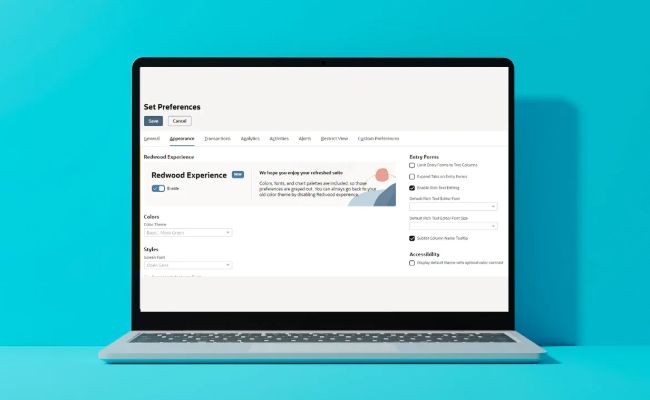
1. Redwood Experience Theme
New NetSuite look and feel that can be enabled by the users. It offers new colors, icons, and fonts for the page header, forms and lists, and dashboards.
2. End of Support for Outbound Single Sign-On (SuiteSignOn)
NetSuite has announced the end of support for the Outbound Single Sign-on (SuiteSignOn) feature. As of NetSuite 2024.1, this feature is no longer supported in nonproduction accounts, such as sandbox accounts. Looking ahead, support for SuiteSignOn in production accounts will cease with the release of NetSuite 2025.1.
What do you need to do?
- Prepare Early: Expect proactive notifications from NetSuite to help you transition before the 2025.1 release.
- Consider Alternatives: NetSuite suggests switching to NetSuite as OIDC Provider feature. Detailed information on this alternative can be found in the NetSuite Help Center.
3. Upcoming Removal of the NetSuite.com Data Source
Another significant change on the horizon is the removal of the NetSuite.com data source. This will be a phased removal process:
- NetSuite 2025.1: The NetSuite.com data source will still be available but unsupported, meaning bug fixes and performance enhancements will no longer be provided, except in the case of a complete outage.
- NetSuite 2026.1: The data source will be entirely removed.
Action Plan
- Transition Early: Begin transitioning to the NetSuite2.com data source now to avoid disruptions when the NetSuite.com data source is eventually removed.
4. Introducing the New Read Only User Role
NetSuite has introduced a new Read Only User Role, designed to provide users with the ability to perform basic tasks such as viewing or approving reports, without granting access to more advanced functionalities. This role is ideal for users who need limited access to oversight or approval processes.
5. Advanced Revenue Management in Configuration Mode
NetSuite has enhanced its Advanced Revenue Management (ARM) capabilities by introducing a Configuration Mode. This feature allows you to configure ARM without impacting your current revenue recognition processes.
Key Points:
- No Impact on Existing Processes: With Configuration Mode enabled, your revenue recognition processes remain unaffected.
- Complete Setup First: ARM cannot be used to recognize revenue until the configuration is fully completed, ensuring that your order-to-revenue workflows are correctly set up before going live.
6. Correction of Work Order Operation Remaining Hours Calculation
Prior to the 2024.2 release, there was an issue with the calculation of the Work Order Operation Remaining Hours field. This has now been corrected with the following updates:
- Before First Completion: The setup time is included in the remaining time calculation only before the first completion.
- After First Completion: The system no longer includes setup time in the remaining time calculation after the first completion. Instead, it multiplies the remaining quantity by the run time.
7. Correction of Work Order Operation Remaining Hours Calculation
NetSuite has introduced a new usage-based pricing model, prepaid usage with monthly consumption. This model allows customers to pay a specified amount upfront and use service lines as needed throughout the contract.
How it Works:
- Prepayment: Customers pay an upfront amount before using any services.
- Usage Deduction: As services are used, the amount is deducted from the prepayment based on the service’s rate.
8. Review Item Line/Inventory Detail Quantity Mismatch Task
The 2024.2 release includes a new task for the Period Close checklist: the Review Item Line/Inventory Detail Quantity Mismatch task. This task helps identify and resolve quantity mismatches between item lines and their associated inventory detail.
Steps to Follow:
- Review and Resolve: The task displays transactions with mismatches, allowing you to review and resolve them.
- Completion Required: The task must be marked as complete before moving to the next task in the current accounting period.
9. Payment Automation SuiteApp 4.0
Streamlines and automates the process of managing and executing payments. It integrates with banks and financial institutions to efficiently handle vendor payments, employee reimbursements, and customer refunds.
Key enhancements:
- Multi-Subsidiary Support: Allows processing payments for HSBC accounts within each US subsidiary in OneWorld accounts, enabling better management across different legal entities.
- Vendor Prepayment Support: Enables the creation and processing of vendor prepayments, streamlining advance payments to vendors.
- Payment Status Tracking: Introduces a visual status tracker for real-time monitoring of payment progress, improving oversight.
- Automated Monthly Fee Recording: Automates the recording of HSBC monthly invoice fees, reducing manual accounting efforts.
- Reprocess Payments: Provides the ability to reprocess payments that encounter errors, enhancing error handling and continuity.
- Additional Enhancements: Includes features like designating email recipients for notifications, new error notification alerts, and an enhanced Vendor Dashboard for better vendor management.
10. Introducing the new Customer 360
It aggregates all up-to-date information from various parts of the business and presents it on a single page, offering actionable insights. This allows you to effortlessly monitor customer interactions, assess their financial standing and business profitability, observe purchasing patterns, and much more.
11. Ship Central
Ship Central in NetSuite is a tool designed to streamline and automate the shipping process. It allows businesses to manage and fulfill orders efficiently by integrating with various carriers, generating shipping labels, tracking shipments, and optimizing packing.
Enhancements include the next:
- Wave-Based Picking: Pack orders by wave transactions or pick cartons via Warehouse Management.
- Mark as Shipped: Adds a “Mark as Shipped” button to packing summaries and allows reopening packed cartons for individual shipping.
- Best Rate Shipping: Automatically selects the best shipping rate by filtering carriers based on delivery date.
- Bill to Recipient: Allows billing shipping costs to recipients or third parties, configurable in preferences.
- Advanced Shipping Options: Provides additional carrier-specific options like handling hazardous materials and duty-paid deliveries.
- Hazardous Materials Shipping: Supports shipping hazardous materials through USPS with additional contact details.
- eCommerce Shipping: Supports shipping charge display on eCommerce sites.
- International Documents: Adds required details for international shipping documents like certificates of origin.
- Return Labels: Enables printing return labels directly from the Options Menu.
- Package Tracking: Displays shipment status on item fulfillment.
These updates underscore the importance of staying informed and proactive with your NetSuite environment. By understanding and preparing for these changes, you can ensure that your organization remains efficient and compliant as NetSuite continues to evolve. Make sure to review these updates with your team and plan accordingly to leverage the new features and avoid any disruptions.